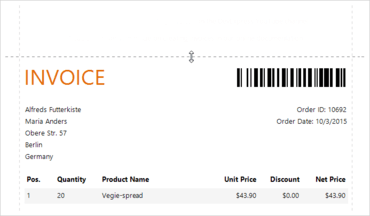
WPF Document Preview에 대화형 여백(interactive margins)을 추가합니다.
기능
- All Platforms
- Expression Bindings - With this mode enabled, you can assign values to not only a limited number of bindable properties, but virtually to any other property of a target report control without using report scripts or conditional formats. It should be considerably easier for your end-users to utilize expressions and internalize the expressions' criteria syntax instead of writing code in script event handlers or using formatting rules to implement custom logic in reports.
- PDF Export - Improved Performance - This release includes a PDF export tool that can create a PDF file page by page without actually creating a report document. The PDF export tool supports streamed and multi-threaded export.
- DOCX Export - Improved Performance - DOCX export is now 25% faster and consumes 5% less memory. Files take up to 50% less memory on the hard drive.
- PDF Export - Acro Forms Support - You can now export a report's edit fields to PDF Acro Forms.
- Miscellaneous Enhancements
- DOCX Export: Right-to-left layout support and the ability to specify document options for the exported file (Title, Subject, Keywords, Category, Comments and Author).
- Object and Entity Framework Data Sources: Improved support for the display of nested properties within the wizard. You can create a master-detail report bound to an object or EF data source with a single run of the wizard (similar to using a SQL data source).
- You can specify the resolution (in DPI) used to rasterize vector images (during export) for the following document formats: DOCX, RTF, XLS, XLSX, HTML, MHT and PDF.
- WinForms
- New Report Template Wizard - Choose from one of predefined templates to create professional-looking invoices in minutes. The updated Report Wizard allows you to map your database columns to predefined invoice fields, select currency formatting options and specify the discount/tax options.
- Web
- ASP.NET Core Support (CTP) - You can now use DevExpress Report controls in ASP.NET Core applications targeting .NET Framework v4.6.1 (available as a Community Technology Preview).
- Property Grid - With the new Property Grid, you can disable property grouping, sort properties and search for a specific property within the grid.
- HTML5 Document Viewer - Improved performance and memory consumption for the DevExpress HTML5 Document Viewer when using the multi-page preview mode.
- Expression Editor Enhancements - The Expression Editor now offers code completion, validation, and an improved design.
- Master-Detail Wizard - Improved support for master-detail report generation using the Report Wizard (available within the Web Report Designer).
- ReactJS and Angular Support - Published code examples demonstrating how the reporting tools can be integrated into React and Angular2 based web applications.
- Filter Editor Enhancements - The Filter Editor features a new Advanced mode, allowing you to specify a filter string instead of using a visual editor.
- Visual Studio Project Templates - Use the Visual Studio templates to create a web-based report application containing the Report Designer and/or Document Viewer control and customize primary settings on-the-fly.
- NPM Support - Your reporting applications can now be deployed using the NPM package manager for Node.js. The package name is 'devexpress-reporting'.
- Miscellaneous Enhancements
- HTML5 Document Viewer - Improved editor for multi-value parameters.
- Query Builder - Ability to search within tables.
- WPF
- Diagram-Based Query Builder and Master-Detail Editor - You can use the new Query Builder to visually construct queries and define relationships.
- Interactive Margins in Document Preview - You can now customize document margins within the Print Preview.
- Support for SVG Icons - Your WPF reports can now use vector SVG icons instead of bitmap images (to help improve rendering on High-DPI displays).
- New Smart Tags for Report Elements in the Report Designer - You can use our new smart tags to quickly access the most popular report band settings within the End-User Report Designer for WPF.
- New Report Template Wizard - Choose from one of predefined templates to create professional-looking invoices in minutes. The updated Report Wizard allows you to map your database columns to predefined invoice fields, select currency formatting options and specify the discount/tax options.
- Multi-Page View Mode and Page-by-Page Scrolling - Display multiple pages (side by side) and disable continuous scrolling.
- Miscellaneous Enhancements
- Selecting the XRRichText control in the Report Designer invokes a full-featured rich-text editor.
- Support for drag and drop operations in the Field List and Report Explorer panels of the Report Designer.
- Field List - You can select and drop multiple fields to create a table with cells bound to data fields.
- Report Explorer - You can drag and drop styles and formatting rules.
Interactive margins in Document Preview.
WinForms, WPF, Blazor, ASP.NET Core, MVC, .NET MAUI를 위한 보고 기능.
궁금한 점이 있으세요?
DevExpress 사 제품 라이선스 담당자와 라이브 채팅

2001 이래 공식 유통업체