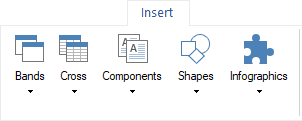
신규 Insert Tab에는 레포트를 개발하는데 필요한 모든 컴포넌트가 유형별로 그룹화되어 포함됩니다.
12월 5, 2017
신규 버전
기능
New Wizards for Creating Reports - New report wizards have been added that allow you to create Invoices, Orders and Quotes. After creating the report, you can edit the template in the report designer.
Pictorial Chart - To visualize the values in this chart, various icons are used. For each row of the chart, you can specify an icon.
Mobile Mode for HTML5 Viewer - In this release, the HTML5 viewer has been adapted to work on mobile devices. You can now view reports and export them directly from your mobile device.
Automatically Check Expressions - When you change an expression, it is now automatically checked. If there is an error it is displayed in the text editor.
New Insert Tab - This tab contains all the components needed to develop a report, grouped by type.
Settings in the Data Dictionary - All data dictionary settings are now shown in a separate menu.
Report Designer Notification Menu - Allows you to see information about the release of new versions, as well as expiration of your Stimulsoft subscription.