홈 / 뉴스 / Syncfusion Essential Studio Windows Forms 2017 Volume 4
Syncfusion Essential Studio Windows Forms 2017 Volume 4
리본 용 빠른 액세스 툴바, 스프레드시트 용 배열 수식 계산, 날짜-시간 선택기를 위한 Office 2016 테마 서포트를 추가합니다.
12월 5, 2017
신규 버전
기능
Calculate
Array formula calculation - Support has been provided for array formula calculations as in Microsoft Excel. An array formula is a formula that can perform multiple calculations with an array or series of data values and return one or more results. It helps to simplify the formula expression. For example, “=MAX (B1-C1, B2-C2, B3-C3, B4-C4, B5-C5)” can now be replaced by the array formula, “{=MAX (B1:B5-C1:C5)}”.
Advanced Date-Time Picker
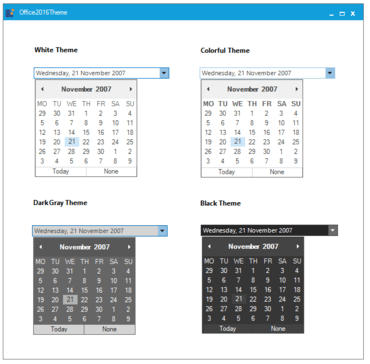
Office 2016 theme support - Office 2016 theme appearance support is provided for the date-time picker control.
Essential DocIO
Word-to-PDF enhancements - Essential DocIO now allows Word documents with line numbers to be converted to PDFs with their original formatting.
Clone and merge enhancements - An option has been added to restart or continue list numbering when merging Word documents.
Group Bar
Office 2016 theme support - Office 2016 theme appearance support is provided for the group bar control.
Main Frame Bar Manager
Office 2016 theme support - Office 2016 theme appearance support is provided for the main frame bar manager control.
Advanced Month Calendar
Office 2016 theme support - Office 2016 theme appearance support is provided for the advanced month calendar control.
Ribbon
Icon for quick access toolbar - Support has been added to provide different icons for the quick access toolbar, similar to the behavior available with the Office colorful theme.
Ribbon merge container enhancement - An option has been provided to merge items in the ribbon merge container based on the position and group.
Customization - The ribbon system buttons’ appearance can be customized based on your needs.
Spreadsheet
Array formula calculation - Support has been provided for array formula calculation as in Excel. An array formula is a formula that can perform multiple calculations with an array or series of data values and return one or more results. It helps to simplify the formula expression. For example, “=MAX (B1-C1, B2-C2, B3-C3, B4-C4, B5-C5)” can now be replaced by an array formula, “{=MAX (B1:B5-C1:C5)}”.
Essential XlsIO
Chart to image enhancement - The manual layout positions of chart elements like the legend, titles, plot area, and display units are now properly converted into images.