Uninstall any software that stores a silent uninstall string in the registry. This string is collected when assets are scanned using the updated scan agent.
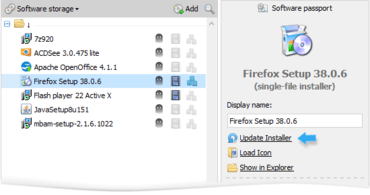
Software installers can now be updated from their passport.
New context menu in the list of installed software.
Improved Test run and recording algorithms for Macro and System shot methods.
A Test run’s result is now saved for the entire duration of the session.
Software passport’s Language field replaced with a more useful Note.
New system of notification about trial version and license limitations.
Advanced search queries can now be used in the Software passport’s search string and in System shot results.
In the list of installed software, a new recommendation will be shown (to rescan a device if it was scanned using an old version of the agent).
If the connection is lost during deployment or uninstallation, a warning will be shown instead of an unexpected error.
If the Windows installer is already busy on the remote computer, deployment and uninstallation will wait for it to finish for 10 minutes.
Improved advanced mode of Microsoft Office configuration file editor (it’s now possible to specify any Product ID).
The algorithm that obtains information and icons from the installer file is now able to work with very large files.
수정사항
Error when copying the deployment log file.
Restoration of the software storage from backup if it becomes corrupted.
Error when loading the network storage.
Errors that may occur when working with the Macro editor.
Error when importing the MS Office configuration file (in the Silent method).
Software installers can now be updated from their passport.