ComponentOne Studio WPF 2018 v1

FlexChart를 위한 신규 MultiSelect Input Control, 차트 및 기능과 프로젝트 테마 및 샘플 탐색기를 추가합니다.
4월 4, 2018
신규 버전

기능

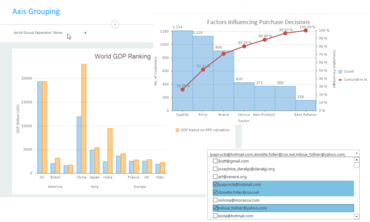
  • New Control: MultiSelect Input Control is a drop-down control that extends ComboBox and adds checkboxes next to each item in the drop-down list, allowing users to select multiple items from a list.
  • New Themed Project Templates: Add a theme before you create your project, includes Office 2016 themes. Makes it even easier to start using ComponentOne controls in your projects.
  • The new C1 Samples Explorer allows users to access samples and demos from a built-in desktop app. When the product installs, users get an additional icon to start up the Samples Explorer. Features allow users to browse and search samples across all platforms, and they can launch the VB or C# script from inside the app. The explorer includes integration into Visual Studio.
  • New charts and features added to the FlexChart include Pareto chart, axis grouping, options for managing overlapping axis and data labels, and custom legend icons.
  • Scheduler
    • Added new embedded themes for Office2010 Blue, Black, and Silver and Office2016 Colorful, White, Black, and DarkGray.
    • Default appearance changed to Office2016 Colorful theme.
    • Improved appointment layout algorithm for short appointments in views with a small visual scale.
  • Expression Editor
    • Added support of alias (DisplayNameAttribute) for fields.
    • Added support of BrowsableAttribute for fields.
    • Aggregate functions with one argument works for all items from DataSource.
    • Added the Round math function.
    • Added alphabetical order for the items of the categories selection.
ComponentOne Studio WPF

ComponentOne Studio WPF

데스크탑 애플리케이션을 위한 100개 이상의 필수 WPF UI 컨트롤.

궁금한 점이 있으세요?

MESCIUS (formerly GrapeCity) 사 제품 라이선스 담당자와 라이브 채팅