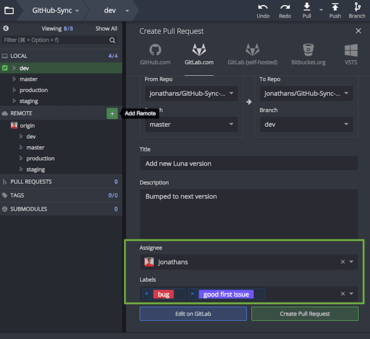
Pull Requests - In this release, Pull Request (PR) functionality is even more robust, which means less context switching between GitKraken and your repository hosting site. You can now do the following when creating a pull request through GitKraken.
GitHub.com and GitHub Enterprise users:
Add assignees
Add reviewers
Add labels
GitLab.com and GitLab Self-hosted users:
Add an assignee
Add labels
Monitor the Status - GitKraken will now display the status of the pull request, reviewer approval and opened/updated date stamps. And for GitHub, this tooltip will show assignees, labels, reviewers, and build status.
Spell Check - Spell check has been added to the commit message box, pull request panel and the commit template field.
More Menu Options - A file menu option has been added to open your repository folder in your default file manager. You can also use the keybind alt + O and a new context menu option to hides all tags.
Improvements
Tooltips for open pull requests have been redesigned and are easier to read.
GitKraken now displays tag annotations.
Selecting the Connect to [Hosting Service] button will take you to the hosting service tab instead of the general authentication tab.
Assign, review and label when creating a pull request.