SQL Prompt에서 사용 할 수 있는 모든 키보드 단축키를 검색합니다.
기능
New in SQL Prompt v9.3
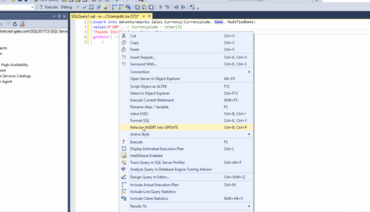
- You can now refactor INSERT statements into UPDATE statements, making it easier to update the data in your tables.
- This can be triggered by either right clicking in the script window and selecting the command, or by using the keyboard shortcut Ctrl+B, Ctrl+P.
- The refactoring automatically adds a default WHERE clause, which you can customize to suit your needs.
- You can now go directly to the Product Learning section of the Redgate Hub from within SQL Prompt.
- Click SQL Prompt > Help > Product Learning to find how-to guides, in-depth technical articles and videos to help you uncover 'hidden gems' and make the most out of SQL Prompt.
- SQL Prompt documentation now contains a list of all keyboard shortcuts available within the product.
- When problems occur during formatting, the formatting actions that were successfully executed and those that were skipped are now displayed along with the failures.
수정사항
Fixed in SQL Prompt v9.3
- SP-7208 : Fixed insert semicolon refactoring when merge statement was used as table source.
Refactor INSERT statements into UPDATE statements with SQL Prompt.
비교, 동기화, 백업, 분석 및 그 이상을 수행하는 SQL Server를 위한 툴 컬렉션.
궁금한 점이 있으세요?
Redgate Software 사 제품 라이선스 담당자와 라이브 채팅

2005 이래 공식 유통업체