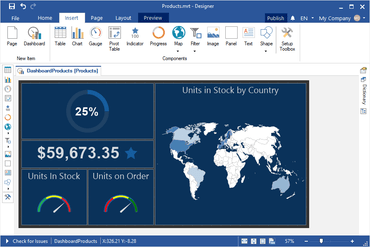
Report Designer - The report designer allows you to create dashboards and edit reports simultaneously. It features an easy-to-use interface, UI localization and supports data from Microsoft SQL, Oracle, MySQL, Firebird and many others. You can sort, group and filter your data before rendering the dashboard.
Dashboard Items - Data analysis elements and filters, as well as additional items, can be placed on dashboards. The data can be processed and displayed using the following elements: Table, Chart, Gauge, Pivot, Indicator, Progress, and Map. Date filtering can also be used to filter data with the help of simple, drop-down, hierarchical, and drop-down hierarchical lists. Additional elements include Text, Image, and Shape.
Report Viewer - Dashboards and their elements are stretched to fit the entire area of the report viewer, which means you can view the whole dashboard or each of its elements in full-screen mode. All items on the dashboard are related to each other. Therefore, the selection of a specific value for one item filters data for other elements of the dashboard. The interactive elements of the dashboard include Table, Chart, Map and all data filtering items. In the report viewer you can export to PDF, Excel, or PNG, either the entire dashboard or each of its elements.