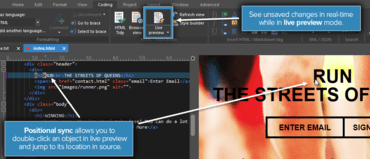
새로운 Markdown 기능을 추가하고, 실시간 미리보기가 제공되는 WYSIWYG와 유사한 HTML 에디팅을 추가합니다.
기능
New in UEStudio v18.20
- Markdown support
- Preview Markdown files (via Coding » Live preview or Browser view).
- Preview is compatible with GitHub Flavored Markdown (GFM).
- Select different styles for Markdown rendering (or add your own).
- Special Markdown syntax highlighting (with new MARKDOWN_LANG) language marker.
- Support for embedded HTML highlighting.
- Live HTML preview
- Split window with code view and browser view.
- Code changes (saved and unsaved) are automatically updated in browser view.
- Position sync: Double-click on element in preview to jump to its location in source.
- Configure under Advanced » Settings » Editor » XML / HTML / Markdown.
- Updated HTML rendering component to support modern HTML / CSS / JS.
- Added support for copying (via Ctrl + C) selected text.
- Git improvements
- New / modified repository files shown at top of file list in both Explorer and Project pane.
- Update / refresh remote branches from Branch Manager.
- Resize Branch Manager columns.
- Git options available in Workspace Manager's "Open" tab context menu.
- Various performance improvements.
- Save state
- Close UEStudio without being prompted to save anything, then pick up where you left off – unsaved changes are restored.
- Works for local, network, FTP, and even unsaved "Edit" files.
- Prefer prompts to save? Disable this feature under Advanced » Settings » File handling » Session options.
- Close unsaved Edit files with no prompt to save
- This optional feature can be set under Advanced » Settings » File handling » Session options.
- Improvements for IntelliTips / auto-complete.
- Improved file tab handling on startup.
- Changed default temporary file location.
New in UltraCompare v18.10
- User interface enhancements
- "Drop here" targets for all modes.
- Increase / decrease font size for all modes.
- Welcome page advertises all types of compares.
- Set font for folder mode.
- Automatic compare after both compare frames loaded (optional).
- Updated browser view component for improved HTML / CSS rendering.
- Improvements and fixes for:
- Comparing FTP files from UE / UES.
- Save result (text format).
- Ignore whitespace.
- Navigating differences.
- Scrolling / scroll bar display.
- 3-way text compare.
- Inline editing.
- Active line window.
- Text compare via web URL.
- Large / long text file compare.
- Folder mode display with filters active.
Live preview HTML editing for UEStudio.
콘텐츠를 작성 및 수정하고, 프로젝트에서 공동 작업하고, 변경을 관리하며, 파워 검색을 수행하고 안전하게 파일을 전송합니다.
궁금한 점이 있으세요?
UltraEdit 사 제품 라이선스 담당자와 라이브 채팅

2013 이래 공식 유통업체