Track Changes - TX Text Control ActiveX X16 enables document collaboration features in your application. Track Changes, also known as redline, or redlining, is a way to keep track of the changes different authors make to a document. These changes can be accepted or rejected by the authors to collaborate on the same document. TX Text Control ActiveX X16 remembers these changes, and stores them MS Word compatible in the document. Changes are visually marked in the Text Control editor and also available in the new sidebar Tracked Changes that lists all changes with a timestamp and author information. This allows multiple users to collaborate by working on the same document.
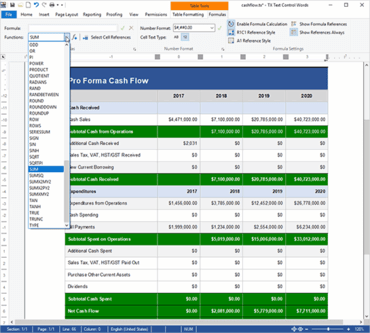
Excel Compatible Formulas - TX Text Control ActiveX X16 supports calculations in a table by using formulas. A formula is a property of a table cell and can be loaded from a SpreadsheetML document or can be inserted using the TXTextControl.TableCell.Formula and TXTextControl.TableCellFormat.NumberFormat properties. TX Text Control ActiveX X16 supports 100+ formulas including most mathematical and trigonometric formulas compatible to Microsoft Excel. Formulas can reference other table cells and the text content of a formula cell is automatically updated when the content of an input cell changes.
Excel Spreadsheet Import - TX Text Control ActiveX X16 supports the SpreadsheetML part of the Microsoft Office Open XML format. This format is a ZIP compressed XML format for spreadsheet processing and is used as the standard format of Microsoft Excel. TX Text Control loads the *.xlsx format from physical files or from memory containing documents formatted with this format. The TXTextControl.StreamType enumeration has been extended with the new SpreadsheetML member. The method TXTextControl.LoadSettings.GetDocumentPartNames returns the names of all document parts of the specified document. Each SpreadsheetML document can contain multiple named worksheets. Using the TXTextControl.LoadSettings.DocumentPartName , the worksheet to be loaded can be defined.