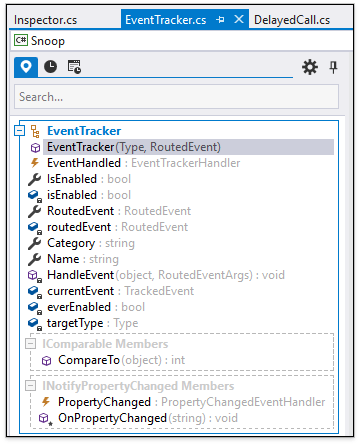
새 Code Places 기능을 사용하여 대용량 코드 베이스를 통해 방법을 찾고 익숙하지 않은 코드를 신속하게 탐색 할 수 있습니다.
3월 5, 2019
신규 버전
기능
Code Places - This release introduces Code Places. This feature helps you find your way through large code bases and quickly explore and unfamiliar code. The Code Places window shows type declarations (class, interfaces, delegates, enums), members (methods, properties, events) and regions from the active C# or VB.NET file. The Code Places window contains the following tabs:
File Places - visualizes types and members for the active file.
History - displays changed code places for the active file. The code places list is cleared when you start to edit another file.
Global History - displays information about changed code places in all files.
Navigation is easy. Just open the File Places tab, and double-click the desired type member in the code places list. CodeRush moves the caret to the corresponding declaration and scrolls the view if necessary to show this code in the editor.
You can use the search field in each tab to find a specific member. CodeRush filters types and members dynamically as you type.
Code Places are fully synchronized with the editor. Changes to code (e.g., adding, removing or replacing a member) results in immediate updates in the File Places tab.
Code Places is turned off by default. To enable it, use the Navigation | Code Places options page or the CodeRush Visualize toolbar.
Unit Testing Improvement - Now you can run MS Test unit tests using the Test Runner in Visual Studio 2019 Preview.
File Places - visualizes types and members for the active file.