
공식 공급 업체
200 이상의 소프트웨어 개발처와 판매 계약을 맺은 공인 디스트리뷰터로서 합법적인 라이선스를 제공합니다.
모든 브랜드 보기.
Profile Management
You now have more control over your service installer’s behavior.
Manage Profiles Dialog
This dialog allows you to manage individual profiles (including PowerShell Core profiles).
Profile Template
You can create a profile by selecting the new profile template. When you select the profile template, you will be prompted to specify the profile location. The dialog will list all the locations with missing profiles. Select a profile to create the file at the specified location. Choose the (Custom Location) option to create an unsaved ps1 profile. Create your own profile ps1 template by adding the “profile” tag. This will trigger PowerShell Studio to display the Select Profile to Create dialog whenever the template is selected.
Notifications
Adds a new notification icon to PowerShell Studio. Now displays a notification when there is a software update available, or when your subscription is about to expire. Access the notifications, by clicking the notification flag icon.
Feedback Menu
New feedback menu added to the ribbon:
WebBrowser Control – New Helper Function
A new helper function Set-WebBrowserEmulation has been added which is automatically inserted when you add a WebBrowser control in the designer. This function will set the Internet Explorer emulation mode for the running executable. This allows the WebBrowser control to support newer html features and improves compatibility with modern websites. Also includes a new snippet for the function (shortcut: setWebBrowserEmulation).
New Theme – Microsoft Office 2019 Colorful
Adds a new theme to PowerShell Studio: Office 2019 Colorful.
Formatting – Option Renamed
Renamed the 'Convert curly quotes' option to 'Convert blog characters' in Options->Formatting. In addition to replacing curly quotes, the option will replace extended dashes with en dashes when formatting code.
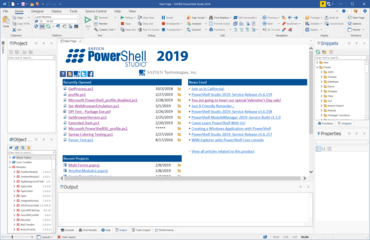
Scripting Environment를 인터그레이션 하였습니다.
SAPIEN Technologies 사 제품 라이선스 담당자와 라이브 채팅

2013 이래 공식 유통업체
전화 : 00798 14 800 6332
팩스 : +1 770 250 6199


