Syncfusion Essential Studio for UWP 2019 Volume 2

PDF 주석에 코멘트 및 리뷰를 추가 합니다.
7월 12, 2019
신규 버전

기능

Word Library

  • Mail merge enhancements - Word library now provides the following features in mail merge:
    • Event to customize clearing unmerged fields during mail merge.
    • Event to customize removing unmerged groups during mail merge.
    • Option to access the new instance (WPicture or WTextRange) replaced during mail merge.

PDF Library

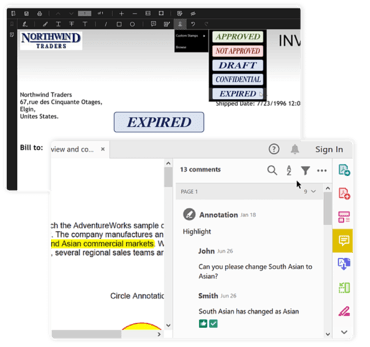
  • Add comments and reviews to the PDF annotation - Set or change PDF annotation review statuses and make comments.
  • PDF 2.0 version support - Create a 2.0 version of PDF.

PowerPoint Library

  • Write Protection - PowerPoint library now allows enabling write protection for PowerPoint presentations.

Charts

  • Customize individual axis element appearance - This feature allows users to customize the appearance of individual axis elements.

PDF Viewer

  • Custom stamp annotation - Custom stamp annotation allows users to include any form of UWP UI element like buttons, text blocks, text boxes, and images anywhere in the pages of the PDF Viewer. You can perform operations like add, move, resize, and delete on the custom stamp annotations. Also, you can save and load existing custom stamp annotations associated with the PDF document in the PDF Viewer control.

TreeGrid

  • Column filtering support (programmatic and Excel-like UI filtering) - This feature allows users to filter nodes using an advanced, Excel-like filtering UI or programmatically. Users can filter columns using the following options:
    • CheckBox filtering
    • Advanced filtering (numeric, text and date-time)
Add comments and reviews to PDF annotations.

Syncfusion Essential Studio UWP

손쉽게 Universal Windows Platform 애플리케이션을 만듭니다.

궁금한 점이 있으세요?

Syncfusion 사 제품 라이선스 담당자와 라이브 채팅