홈 / 뉴스 / dbForge Developer Bundle for SQL Server 5.8.10
dbForge Developer Bundle for SQL Server 5.8.10
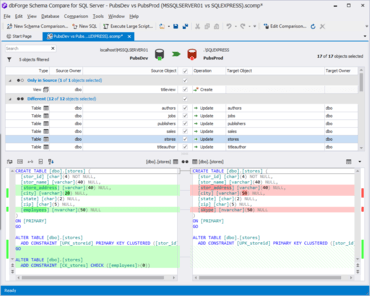
Schema Compare에는 새롭게 디자인된 Objects Text Diff 컨트롤이 포함됩니다.
9월 3, 2019
신규 버전
기능
dbForge Schema Compare for SQL Server
Object Filter - Allows you to filter objects in a comparison document. Applying advanced filters makes the analysis of schema comparison results more effective, informative, and bespoke. The feature also allows you to apply multiple filers and create custom filters with the Filter Editor which can be saved, and used for further comparisons.
Redesigned Objects Text Diff Control - The coloring model of diffs highlighting simplifies analysis of schema comparison results and speeds up the whole schema comparison process.
Redesigned Generate Comparison Report Window - The window has been completely redesigned with all the report generation options neatly regrouped. In addition, users can select how script diffs will look in their reports.
Redesigned schema comparison report in HTML - HTML reports include new smooth design and are more informative. Apart from information about objects, now HTML reports include actual script differences.
Redesigned Schema Comparison MS SSMS Add-in Window - The window has become more functional and features Copy to Target, Swap, Copy to Source buttons. If you use dbForge Source Control for SQL Server add-in along with Schema Compare, you can select a certain Source Control repository as Source or Target.
dbForge Data Compare for SQL Server
Redesigned Data Compare Control - Viewing of exact data differences has become clearer. Grid tabs are now more informative with crisp data differences highlighted.
Redesigned Data Comparison Report Window - The window has been completely redesigned with all report generation options neatly regrouped.
Redesigned data comparison report in CSV - Now Data Compare for SQL Server generates several report files in CSV format. One of them contains summary results, and the rest of the files contain specific data diffs info.
Redesigned Data Comparison SSMS Add-in Window - The window has become more functional and features Copy to Target, Swap, Copy to Source buttons. The window also allows you to select a scripts folder as Source or Target.