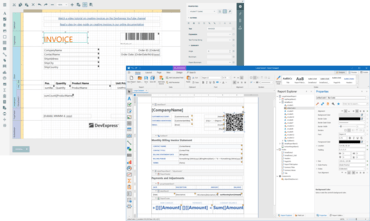
End-User Report Designer를 개선합니다.
수정사항
- A report is cropped when printing it using the PrintToolBase class under the .NET Core platform
- DashboardJsonDataSource - InvalidOperationException is thrown when RootElement contains a number
- End-User Report Designer - The Expression Editor doesn't work correctly with fields if their display names are specified using the DXDisplayName attribute
- Export to Mht - "</htm" text is shown at the end of the document (.NET Core)
- FilterString Editor - The autocomplete feature does not work correctly if there is name collision
- Hide the Report Template option on New Report Wizard
- Memory leak occurs in the End-User Report Designer if the property grid has the UseOfficeInspiredView mode
- Parameters - A parameter value specified via an expression binding is not calculated during the report export in code
- Parameters Panel - A parameter editor doesn't show a default value of a floating point parameter and the value cannot be changed
- ReportsV2 - CollectionDataSource does not recognize Entity Framework types at design time
- The DetailBand.FillEmptySpace option doesn't work if there is a PageFooter band on a page
- The DevExpress.XtraPrinting.Native.PrintingSettings.UseGdiPlusLineBreakAlgorithm property doesn't work in a specific scenario
- The EmailOptions.Body property doesn't allow entering multiline text in the Property Grid
- The Text Annotation's height is not calculated automatically if the TextAnnotation.Width property is set
- Visual Studio Report Designer - Data Source Wizard automatically closes in a .NET Core application
- WPF Report Designer - A parameter lookup value and display member properties are reset on loading the report if fields assigned to these properties were not found in this lookup's data source
- XRLabel with the <sup> tag - Export To Text - The ? symbol appears for a label with the superscript text
- XRLabel with the <sup> tag - Superscript text appears below the normal line while it should appear above
- XRLabel with the <sup> tag - Superscript text is missing in PDF
- XRRichText - Soft-hyphen symbols are drawn behind text on report preview
- XRRichText does not render HTML text correctly when the AzureCompatibility option is enabled
- XtraReport - Child tables referenced through relationships are not rendered (the nullable type issue)
WinForms, WPF, Blazor, ASP.NET Core, MVC, .NET MAUI를 위한 보고 기능.
궁금한 점이 있으세요?
DevExpress 사 제품 라이선스 담당자와 라이브 채팅

2001 이래 공식 유통업체