
PhpStorm 2019.3.1

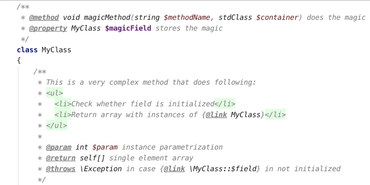
PHPDoc 블록 용 사용자 정의가 가능한 강조표시를 향상시킵니다.
12월 20, 2019
신규 버전

기능

  • Customizable auto-insertion of short tags - PhpStorm 2019.3 introduced the ability to automatically insert <?php as soon as you type <?, which can help you deprecate short tags: But because short tags are still a part of PHP, this turned out to be a bit excessive. That is why this version adds several enhancements to the feature.
    • First, you can now opt out completely. In the PhpStorm preferences, go to Editor | General | Smart Keys | PHP and clear the Auto-insert ‘<?php’ tag after typing ‘<?’ checkbox:
    • Second, PhpStorm will filter out the extra php if you happen to type it reflexively, so <?phpphp should no longer occur. And, to remove the php part, you only have to press Backspace once:
  • Customizable highlighting for PHPDoc blocks - Another feature that required a more tailored approach is colored highlighting for PHPDoc blocks, which was introduced in 2019.3. It turns out that change was a bit too radical for some, so now it’s possible to customize the colors used. In the PhpStorm preferences, go to Editor | Color Scheme | PHP | PHPDoc, clear the Inherit values from checkbox on the elements you’d like to customize, and then set the desired colors.
Improves customizable highlighting for PHPDoc blocks

PhpStorm

리팩토링, 코드 완성, 즉석 코드 분석 및 코딩 생산성 지향 기능을 갖춘 PHP IDE.

PhpStorm 도 구매할 수 있습니다:

궁금한 점이 있으세요?

JetBrains 사 제품 라이선스 담당자와 라이브 채팅