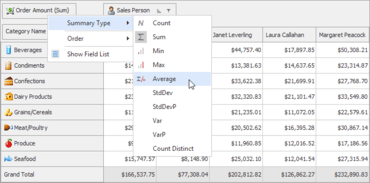
Pivot Grid는 데이터 필드 헤더의 컨텍스트 메뉴에서 요약 함수를 선택할 수 있는 기능을 추가합니다.
기능
- Expression-Based Filters - The VCL Grid, TreeList, and Vertical Grid controls now allow users to calculate filter operands using formulas written as string expressions.
- Find Panel Enhancements
- Compact Layout - The VCL Grid, TreeList, and Vertical Grid controls now offer a new layout option for their Find Panel. In this layout, the panel shrinks its elements and arranges control buttons inside the Find box.
- Group By Box Integration - In addition, the Grid control allows you to integrate the Find Panel with the Group By box.
- Find Box Enhancements
- Added an option to display the Clear button in Search mode.
- An empty MRU list automatically hides its button.
- Grid Control
- Modal Edit Forms - Any built-in Edit Form can now be displayed as a modal window. You and your users can customize its layout as needed.
- ORM-Based Table View - The Table View was first introduced in December 2019 as a beta. This update marks its official release. The ExpressEntityMapping Framework (ORM) now ships with six new attributes for your entity models. These attributes help you define display and edit properties for View columns or dataset fields that are mapped to an entity.
- Performance Enhancements - The optimized text measurement mechanism for single-line cells in Table and Banded Table Views makes the UI more responsive and accelerates Best Fit calculations – they are up to four times faster than in previous versions.
- Skins Library
- New Microsoft Office 2019 Skins - This release introduces three new Microsoft Office 2019 vector skins - White, Dark Gray, and Black.
- New Basic Skin - v20.1 includes the Basic skin first introduced in the WinForms product line. This skin ships with six color palettes.
- Spreadsheet
- Ability to replace all built-in dialogs with custom equivalents.
- The following new events allow you to customize built-in popup menus or replace them with custom menus: OnPageControlContextPopup and OnTableViewContextPopup.
- You can handle the following new events to respond to drag-and-drop operations with worksheet tabs: OnPageControlTabStartDrag, OnPageControlTabDragAndDrop, and OnPageControlTabEndDrag.
- The Formula Bar component's Name box now allows users to rename containers and navigate between them.
- Users can press Ctrl+Arrow key to navigate between data blocks. The Ctrl+Shift+Arrow key combination selects their cells.
- The "Insert Function" dialog includes a search box that allows users to filter out functions and display only those whose name or description contains a given search string.
- Pivot Grid
- End-users can select a summary function from a data field header's context menu.
- New CountDistinct summary function.
- New group intervals for date-time fields, including: "Half Year, Year", "Quarter, Year", and "Month, Year".
- New repository allows you to store custom group intervals.
- Layout Control
- A layout group can now display a check box next to its caption. The check box toggles the enabled state of child elements in the group. You can handle a new event to override the default behavior.
- Layout item captions can include text formatted via the BBCode-inspired markup tags introduced in v19.2.
광범위한 그리드, 인쇄, 피벗 테이블, 트리 목록(tree list), 레이아웃 및 스키닝(skinning) 기능을 Delphi 및 C++Builder 애플리케이션에 추가할 수 있습니다.
궁금한 점이 있으세요?
DevExpress 사 제품 라이선스 담당자와 라이브 채팅

2001 이래 공식 유통업체