최신 툴킷과 기존 툴킷에 대한 새로운 예를 추가하고 품질, 성능 및 유용성을 향상시킵니다.
9월 15, 2020
신규 버전
기능
Highlights
Several improvements to the Data Grid, Fields, Charts and Buttons widgets.
Enhancements to Ext JS Grid scrolling experience.
Many quality improvements addressing customer reported tickets.
New Kitchen Sink examples and directly usable ready-to-go templates for both toolkits.
Over 30+ new fiddle examples in Ext JS API Docs.
Upgraded Froala WYSIWYG Editor to latest version 3.2.1.
Ext JS Kitchen Sink Examples
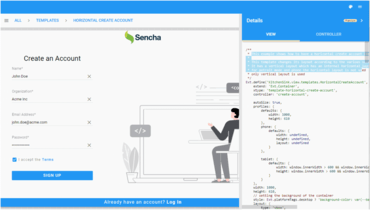
New ready-to-go ‘Login Form’ templates that include handy examples that can easily be directly copy-pasted into your application. Learn how to:
Create a responsive login form.
Create a template to reset user password.
Create a responsive create account template.
Easily navigable and ‘searchable’ component examples for the Modern toolkit.
Quickly search for examples via the ‘Menu search’ option.
View corresponding code and directly implement it into your application.
The tree view navigation exists in the Kitchen sink classic toolkit and has been expanded for the modern toolkit.
New API Component Examples
Added over 30+ Data Grid API component examples and fiddle links so you can directly copy-paste the code into your application.
Check out Ext.grid API examples in the API docs for Classic and Modern Toolkit.
New examples have been added for Columns (check, drag, tree, date, text, boolean), Plugins (row operations, clipboard, summary, drag-drop), Filters, Selection (rows, cells, header) and many more.