TX Spell .NET for WPF 8.0

WORDCHARS, BREAK 및 ICONV 특수 문자 플래그(flag) 지원을 추가합니다.
12월 4, 2020
신규 버전

기능

  • 4k DPI Awareness - Added DPI aware support for all dialog boxes.
  • Per Monitor DPI Awareness - Added supports for multiple monitor setups where each display has a different scale factor, and the application is moved from one display to another.
  • Dictionary Performance - This release significantly decreases the time to load a user dictionary, and the memory footprint for loaded user dictionaries.
    • A feature of TX Spell .NET for WPF is the possibility to use multiple dictionaries at the same time for the spell checking process. This is valid for language dictionaries and user dictionaries.
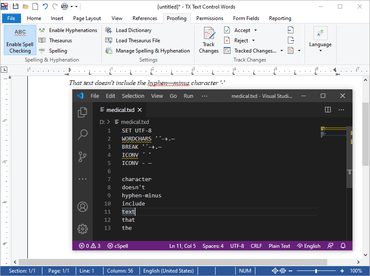
  • Special Character Support - For OpenOfficeDictionaries, this release supports special character flags such as:
    • WORDCHARS to define a list of additional word characters.
    • BREAK flag that provides characters that are handled both as character and delimiter.
    • ICONV flat that defines characters that have to be interpreted as another string when spell checking text.
      • This version supports these flags in user dictionaries as well in case they are determined at the beginning of a user dictionary file.
      • TX Spell .NET for WPF spell checks documents based on these special character conditions as well.
Special character support

TX Spell .NET for WPF

TX Text Control .NET for WPF 개발 애플리케이션을 위한 강력한 맞춤법 검사 및 언어 툴.

궁금한 점이 있으세요?

Text Control 사 제품 라이선스 담당자와 라이브 채팅