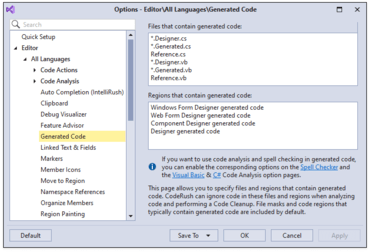
Exclude Generated Code from Analysis - CodeRush now allows you to exclude files and code regions that contain generated code from code analysis and code cleanup. Just open the Editor | All Languages | Generated Code options page and add the necessary file patterns or region titles to bypass during analysis and code cleanup.
Smart Dot Enhancements
You can now quickly multi-press the dot key (".") when the caret is inside parens in a method call with parameters. CodeRush will move the dot and caret outside the closing parenthesis, allowing you to quickly access a member of the method's return value. Each additional press of the dot key will move the dot out to the right of the next closest closing parenthesis.
You can also place the caret inside square brackets ("[ ]"), for example, in a list element or array element, and double press the dot. CodeRush will move the dot and caret to the right of the closing bracket.
You can set the multi-press speed in the Smart Keys options page. The default value is 500 milliseconds. If two back-to-back dots are pressed within this time frame CodeRush applies the Smart Dot feature and suppresses IntelliSense. This setting lets you determine which feature to use when both Smart Dot and IntelliSense are available.