IntelliTips 코드 완료 및크기 조절이 가능한 찾기 및 교체 대화 상자를 추가합니다.
기능
New in UltraEdit v28.00
- IntelliTips:
- Code-aware suggestions for auto-completing class members, methods, etc.
- Function tips for typing parameters in function call.
- UltraEdit parses active file and parent folder for symbols.
- Supports local files and files opened via FTP.
- Optionally scan other folders.
- New config options in Settings - Auto-complete - IntelliTips.
- Improved auto-complete:
- Fully themed auto-complete dialog.
- Choose when auto-complete automatically shows in Settings - Auto-complete.
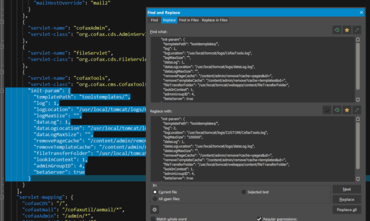
- Fully resizable Find and Replace dialogs.
- New context menu option "Delete lines" in Find String List to delete all lines containing string.
- New option to "Highlight all items found" with Replace.
- "Highlight all selected" optionally matches:
- Whole word only (and optionally only when selection is a whole word).
- Case.
- Configure in Settings - Search - Advanced.
- "Save and Close" command.
- "Open last-closed tab" option (file tab context menu).
- Ability to save an empty, new file.
- Save As option to leave both original file and new file open:
- Added support for remote (FTP) files as well.
- Go to previous and next position using forward and back mouse buttons.
- Dynamic highlighting of XML and HTML attributes and values.
- Clicking in line margin to select now selects entire soft-wrapped line.
- Expanded theme support with most dialogs using theme colors.
- Other minor enhancements and issues addressed.
Fully resizable Find and Replace dialogs
UltraEdit, UltraCompare, UltraFinder, UltraFTP의 네 가지 강력한 통합 애플리케이션을 포함합니다.
궁금한 점이 있으세요?
UltraEdit 사 제품 라이선스 담당자와 라이브 채팅

2013 이래 공식 유통업체