DevExpress Blazor UI Components 20.2.6

Blazor Data Grid, Scheduler 및 Chart 컨트롤을 향상시킵니다.
3월 25, 2021
신규 버전

기능

Data Grid

  • Drop-Down Width Modes for Combobox Columns - Added the DropDownWidthMode property to the Data Grid's combobox column. Use this property to set the width of the combobox column editor’s drop-down list. This editor is displayed within the filter row and edit form. The following three modes are available:
    • ContentOrEditorWidth (Default) - Item text is fully displayed. Minimum list width matches the editor.
    • ContentWidth - List width equals the width of the longest list item.
    • EditorWidth - List width matches the editor. List items are truncated if they do not fit.

Scheduler

  • New API to Track StartDate Changes - The StartDate property now supports two-way binding to the data field. A new StartDateChanged event allows you to track StartDate property changes and perform any necessary custom actions.
  • Common Settings for Recurrent Appointments - Added a new DxSchedulerRecurrenceSettings class that allows you to specify common values for appointment recurrence properties. You can specify an instance of this class with your own configuration to the new RecurrenceSettings property of the Scheduler Data Storage.

Chart

  • Grid Lines - A new DxChartAxisGridLines.Visible property allows you to display or hide grid lines (per axis). By default, the Blazor Chart displays grid lines for the value axis but hides them for the argument axis. To change grid line visibility for an axis, add the DxChartAxisGridLines component and set the Visibility property.
  • Tooltip Position - You can display the DxChartTooltip component inside or outside a series using the new Position property.

Data Editors

  • HTML Events - DevExpress Blazor Editors ship with a comprehensive API (properties, methods, and events) to help you configure and customize the components. If the included API does not meet your requirements, you can use standard HTML attributes and event handlers to further configure the Blazor components. HTML event handlers are automatically assigned to the component’s input element. This ensures that events such as onblur or onfocus work seamlessly with the components.
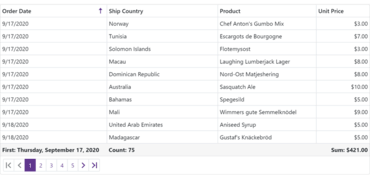
DevExpress Blazor Data Grid

DevExpress ASP.NET and Blazor

하나의 패키지에 DevExpress가 생성한 모든 수상 경력에 빛나는 ASP.NET, MVC, ASP.NET Core 및 ASP.NET Bootstrap 및 Blazor 컴포넌트 제품군, 라이브러리 및 확장을 제공합니다.

궁금한 점이 있으세요?

DevExpress 사 제품 라이선스 담당자와 라이브 채팅