기능
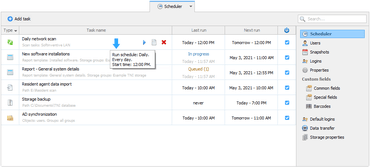
- Added a new task scheduler.
- Separate Scheduler for each storage - The scheduler is now located on a separate tab so each TNI storage can now have a unique set of Scheduler tasks.
- You can create a schedule for:
- Network scanning.
- Building and sending table reports.
- Synchronization with AD.
- Creating a backup copy of the storage.
- Importing new data into the storage.
- You can now schedule various tasks with maximum flexibility at exactly the time and frequency that suits you. Some of the new features include:
- Flexible configuration of frequently repetitive tasks, for example, to perform scanning in a loop.
- Scheduled table reports can now be generated based on any groups of your storage and multiple reports can be generated at the same time.
- You can now specify individual synchronizable objects for scheduled synchronization with AD.
- Skipped tasks can be automatically executed after TNI is started, if the ‘Run skipped tasks’ option is enabled.
- Any scheduled task can be run in ‘Silent mode’ without distracting you or creating entries in the Application events log.
- Any task can be interrupted by the user at any time.
PC 감사 및 소프트웨어 재고 관리 솔루션입니다.
궁금한 점이 있으세요?
Softinventive Lab 사 제품 라이선스 담당자와 라이브 채팅

2015 이래 공식 유통업체