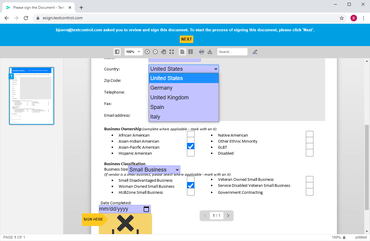
DocumentViewer for ASP.NET는 이제 Word 호환 양식 필드의 완성을 지원합니다.
기능
- Completing Form Fields - Version 29.2 of the DocumentViewer for ASP.NET supports the completion of Microsoft Word compatible form fields.
- A feature of TX Text Control form fields is the usage of Conditional Instructions. It is possible to add dependencies between fields based on logical operators. This allows you to add a complete workflow to forms by adding dependencies between form fields.
- These form field conditions are now implemented in version 29.2. Forms created with TX Text Control using the online editor or using one of the Windows versions can be loaded into the DocumentViewer which switches automatically into the form completion mode.
- Using conditional instructions, fields values can be controlled and relations between fields can be implemented. Typical instructions are:
- Enable form fields based on a selected/added value of another form field.
- Mark fields as invalid based on content.
- Specify form field content or items based on the content of another form field.
- Validate entries based on string or numeral comparisons.
- Stamps, Sticky Notes and Comments - The TX Text Control DocumentViewer provides these annotation and collaboration features to all supported document formats including MS Word DOC, DOCX, RTF and the internal TX Text Control format. The annotations are not stored within the document which allows you to share annotations with all document types that are supported including DOCX, DOC, RTF and PDF. The DocumentViewer provides all typical annotation types out-of-the-box:
- Textual Highlights are used to add a comment to a range of text.
- Notes are inserted at any location to add a textual note.
- Text can be added at any location of a page.
- Stamps can be customized and inserted at any location.
- Drawings are used to mark locations in a document.
ASP.NET Core, Angular, React, JavaScript, Blazor 애플리케이션에 강력한 문서 처리 기능을 추가하세요.
궁금한 점이 있으세요?
Text Control 사 제품 라이선스 담당자와 라이브 채팅

1998 이래 공식 유통업체