홈 / 뉴스 / Syncfusion Essential Studio WPF 2021 Volume 4
Syncfusion Essential Studio WPF 2021 Volume 4
다이어그램에 대화형 요소를 그룹화할 수 있는 컨테이너 지원을 추가합니다.
1월 4, 2022
신규 버전
기능
Diagram
Drawing angled connector - This feature allows users to draw connectors precisely at 0, 45, 90, 135, 180, 225, 270, or 315 degrees from a point by holding down the Shift key.
Containers - Containers are collections of logically grouped shapes surrounded by a visible border, which the shapes can be dragged in and out of during runtime.
Connector splitting - Split an existing connector easily by dropping a shape on it.
Selection improvement - Display a compact-sized thumb when selecting nodes and display tooltips relatively near the thumb on resizing.
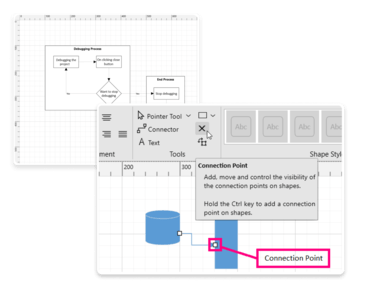
Connection point interaction - Add or move connection points interactively.
Annotation interaction - Select, move, resize, or rotate the annotation within a node/connector.
PDF Library
PDF to PDF/A Conversion enhancement:
Improved performance in PDF to PDF/A conversion.
You can now convert PDF to PDF/A-2u and PDF/A-3u.
PDF Viewer
Hide, show, and remove annotations - Users can hide, show, and remove annotations programmatically at runtime using the annotation’s name.
Add custom stamps - Users can now add custom stamps programmatically to PDF files.
Bring annotations into view - This feature automatically scrolls the control to bring an annotation into view.
TreeView
CollectionView support - Users can now bind CollectionView type sources.
Microsoft Visual Studio Extensions
Added Microsoft .NET 6.0 Support - Extended the Syncfusion WPF Visual Studio 2022 extension by providing .NET 6.0 support to Syncfusion WPF project template, item template, and reference manager.
Container support allows interactive element grouping