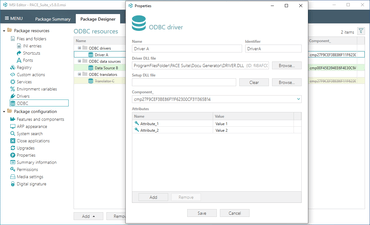
ODBC 드라이버의 설치 및 구성을 효율적으로 처리합니다.
기능
- UI for ODBC - Open Database Connectivity (ODBC) is a standard API for accessing various database systems. With this release of PACE Suite, you can now efficiently handle the installation and configuration of ODBC drivers, data sources, and translators of your MSI package.
- The advanced validation rules reduce human errors and increase package quality.
- The new ODBC UI of Package Designer collects data from the ODBCDriver, ODBCAttribute, ODBCDataSource, ODBCSourceAttribute, and ODBCTranslator MSI Tables transforms, and presents them in a user-friendly view.
- You can immediately assess the ODBC resources and their number that your package is installing.
- If needed, you can modify the existing and add a new ODBC driver, data source, and translator.
- UI for Close Apps - Added new UI for Close Apps functionality in the Package Designer that enables users to configure which processes and in which way must be closed when installing and uninstalling the package.
- It helps users save time on writing additional scripts, ensures clear package removal and correspondingly reduces the cost of the package.
- This new view enables you to easily define which apps should be closed. For each application, you can configure how to:
- Shut it down.
- Send Close and/or End Session messages.
- Terminate after timeout if still running.
- Prompt the user with a message.
- Set an MSI property for creating a further installation behavior.
- Or choose other convenient options.
패키지 프로그램(packagers)에 영감을 받고, 패키지 프로그램을 위해 디자인 하였습니다.
궁금한 점이 있으세요?
Infopulse 사 제품 라이선스 담당자와 라이브 채팅

2017 이래 공식 유통업체