When saving a new C++ project, the IDE will now prompt you to save the project itself first, followed by the new unit(s).
The precompiled header will be saved automatically as part of saving the project without prompting you for a filename and location.
Optional auto-save on project creation
In order to enable Code Insight to work immediately when a project is created and match the behavior of other C++ IDEs, there is now an optional feature to save a project and file instantly when it’s created.
This feature can be modified in IDE Options > Desktop > Saving. However, this is off by default to preserve behavior for those used to the traditional workflow.
Progress Notifications
In this release progress notifications for C++ LSP parsing are now shown in the LSP progress bar at the bottom of the Projects view, like for Embarcadero Delphi.
Multiple Navigation locations
In this release a dropdown list similar to code completion is shown, allowing you to choose where to navigate with the keyboard or mouse.
If the location is already open in the editor, this includes further contextual information.
Delayed indexing
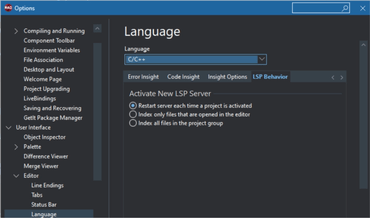
Indexing source code can use a lot of CPU. The LSP server would default index whenever a file is modified. This release introduces a setting to optionally index only when you save (Ctrl+S).
Indexing All Projects and Files
Added new ‘Index all files in the project group’ setting.
Quality Improvements
This release contains several improvements and quality fixes for C++ developers using Embarcadero C++Builder and Embarcadero RAD Studio 11.1. This includes: