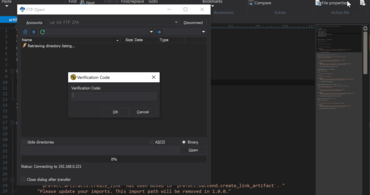
SFTP(2FA 지원)에 대한 대화형 로그인과 라이브 미리보기를 위한 WebView2 통합을 추가합니다.
기능
- Added an interactive login for SFTP (2FA support):
- You can now connect to servers that require two-factor authentication (2FA) or time-based one-time passwords (TOTP).
- Added new "Interactive login" account option (Advanced tab).
- Added a single persistent connection which is used for 2FA accounts to prevent multiple 2FA prompts.
- The connection stays alive during file editing to avoid further 2FA prompts.
- Improved Google Chrome (Edgium) rendering for browser view / live preview:
- Upgraded HTML / Markdown preview to modern rendering engine.
- Requires WebView2 browser component from Microsoft (included in Windows 11, available on Windows 10).
- Added a fallback to older browser control for legacy rendering on systems not supporting WebView2.
- Command palette expansions:
- Added the ability to quick open any previously opened file.
- Added the ability to quick open any file.
- Added Go-to shorthand.
- Templates are now included in command palette.
- Syntax highlighting parser overhaul:
- Syntax highlighting is now maintained when selecting.
- Added support for block comments opened with same characters as line comments.
- Added support for arbitrary string pairs (square brackets, backticks, etc.).
- Added support for Perl quote-like string operators like qq(STRING).
- Improved XML code highlighting with embedded CDATA sections.
- HTML Tidy overhaul:
- Updated HTML Tidy library to latest version.
- Added a new HTML Tidy UI with dozens of additional options.
- Added a new command and associated key mapping to run HTML Tidy.
- Output window improvements and additions:
- You can now add and remove any number of output windows.
- Added the ability to rename output window tabs.
- Added the ability to select and copy partial or whole lines in output window.
- Other notable user experience improvements:
- Added the ability to rename unsaved file tab.
- User tools now automatically import embedded icon from external executable.
- Re-engineered user clipboards now support selections of >4 GB (exceeding Microsoft Windows clipboard limitations).
- "Add file to project" now uses regular File Open dialog.
- Reformat JSON now automatically applies code highlighting.
- Size column is now right-aligned in all FTP file lists.
2-factor authentication (2FA) for SFTP connections.
UltraEdit, UltraCompare, UltraFinder, UltraFTP의 네 가지 강력한 통합 애플리케이션을 포함합니다.
궁금한 점이 있으세요?
UltraEdit 사 제품 라이선스 담당자와 라이브 채팅

2013 이래 공식 유통업체