
공식 공급 업체
200 이상의 소프트웨어 개발처와 판매 계약을 맺은 공인 디스트리뷰터로서 합법적인 라이선스를 제공합니다.
모든 브랜드 보기.
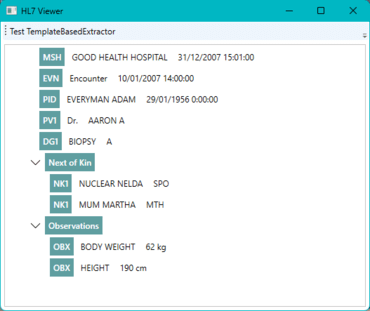
This article will demonstrate how to parse a file in the Health Level Seven (HL7) version 2 (V2) format and show its contents in a tree view in a Windows Presentation Foundation (WPF) application. It uses GrapeCity ComponentOne libraries, from ComponentOne Studio Enterprise, to parse the HL7 file and for its representation in a tree view, making it much easier to read and interpret. Health Level Seven (HL7) refers to international criteria for transferring clinical and administrative data between software applications used by various healthcare providers.
The ComponentOne TextParser library supports three different extractors for different scenarios, including plain text, a specialized HTML extractor, and a template-based extractor. The template-based extractor is the most generic, as it allows users to parse data structures following a declarative XML template. Since the template can be provided as a separate file, it allows you to provide both the template and source to parse.
HL7 V2 is not a simple data format, but using the TemplateBasedExtractor class, which relies on the XML template, you can parse the file so that further processing becomes easier. Representing the data in a tree view is made easier with the c1:C1TreeView component. The data binding is straightforward, and you can easily style everything.
Using the TemplateBasedExtractor class simplifies the process because it reads the file and makes it available in an easy-to-use object model. In the InterpretExtractedData method, you need only interpret the different fields according to their segment type. If you elaborate on the XML template further, extending the object model and simplifying the InterpretExtractedData method is possible. Adding a button to the application allows you to test this conveniently.
Read the complete blog post to get started now.
뛰어난 성능을 갖추고 확장이 가능한 모바일, Web 및 데스크톱용 .NET UI 컨트롤의 완전한 컬렉션.
MESCIUS (formerly GrapeCity) 사 제품 라이선스 담당자와 라이브 채팅

1996 이래 공식 유통업체
전화 : 00798 14 800 6332
팩스 : +1 770 250 6199


