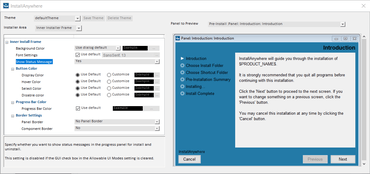
사전 제거 및 사후 제거 시퀀스에 맞춰 Image, Label, Help 설정을 사용자 지정합니다.
7월 25, 2023
신규 버전
기능
Added support for LZMA2 compression using 'Expand 7-Zip' action - The 'Expand Archive (7-Zip) action' now supports both LZMA and LZMA2 compression methods to expand a 7-Zip archive (.7z or .xz) on a target system.
Customize Image, Label, and help settings for pre-uninstall and post-uninstall sequences - In this release, you can now enable and customize the following tabs:
Image settings - Customize the Image Settings tab on the Properties Customizer.
Label Settings - Customize the Label Settings tab on the Properties Customizer.
Help Settings - Customize the Help Settings tab on the Properties Customizer.
Added support for the Microsoft Windows 11 Smart App Control - InstallAnywhere now supports the Smart App Control feature of the Windows 11 operating system.
Added support for Apple macOS Sonoma - The Setups created with InstallAnywhere 2023 R1 can now run on macOS Sonoma.
Customize the Choose Alias, Link, Shortcut folder - This new setting lets you to select the default options for Windows Shortcuts, UNIX Links and macOS Aliases which will be displayed during the installer run time.
Prevent automatic reading of Default Response File - A new setting has been added to disable the installers' ability to automatically read the default response file.
Prevent Default Response File creation in Silent Mode - A new setting has been introduced in the Project Information area which enables you to prevent end users from being able to generate the default response file in silent mode.
Added a usage message for a missing or invalid argument - In this release, a usage message including the appropriate available options will be displayed on the console when you pass -i command-line switch without an argument or with an invalid argument for launching the installer.
Encrypted the Notarization Information - In this release, the following notarization credential information saved in the project are now encrypted: