Released: Jun 11, 2012
Updates in this release
Updates in 12.1
WinForms
- Coded UI Support - Create automated tests for your user interface to perform functional testing and validation
- Metro Inspired Touch Tile Control - Enhancements include control/group headers and extra large tile options
- Docking and Metro UI - Deliver Windows 8 Metro UI inspired WinForms applications
- Ribbon - Much like the Microsoft Ribbon UI, the DevExpress WinForms Ribbon Control can now be fully customized by your end-users at runtime
- Rich Text Editor - Now supports floating objects and ships with a Style Gallery
- Scheduler - Now includes integrated Range Control support, new animation effects and resource tree filtering options
- TreeList - HTML text formatting and extended clipboard support options
- Layout Control - Now includes extended layout and data field capabilities
- Reporting - New Report Gallery options for end-users
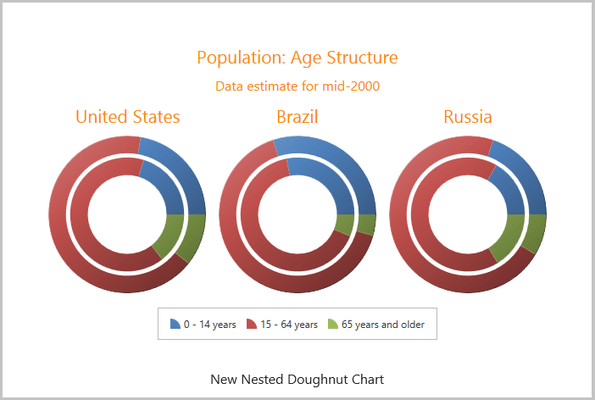
- Charting - Enhanced performance and key usability features such as auto-data type detection and built-in tooltips and cross-hair support
- Pivot Grid - Now includes filtering by summary value and improved OLAP browsing options
ASP.NET
- New iOS Theme - New iOS-like application-wide theme designed and optimized for touch interfaces
- ASP.NET Reporting - ASP.NET Reporting suite has been extended with a new "Intelligent Mail" barcode type and Look-Up Parameter Editors
- ASP.NET Grid - Column header filter dropdowns can now contain check lists allowing end-users to select multiple items to be included in the filter criteria
- ASP.NET Navigation Controls - New features include page size selector, pane auto sizing, zone orientation mode and fade-in animation
- ASP.NET Charting - Auto-data type detection, built-in tooltips and cross-hair support
- ASP.NET Pivot Grid - Now includes automation features and improved OLAP browsing options
- MVC Grid - The new version extends the grid with column header filter dropdowns and page size selectors
- MVC Pivot Grid - Drill Down functionality, standalone field list extensions, OLAP binding options and chart automation features
- MVC Scheduler - New ASP.NET MVC Scheduler Extension with the same features as the ASP.NET Scheduler control
- MVC Dock Windows - New Docking Suite includes several controls to build dashboard style interfaces
- MVC Popup Menu - A new Popup Menu extension allows you to enrich your MVC-powered sites with context-sensitive action lists
- MVC Loading Panel - Visually indicate UI unavailability during time-consuming operations
WPF
- New WPF Themes - Three new WPF application-wide themes
- Grid Control - Integrated Master/Detail and easy to use end-user search panel
- Ribbon - Now supports Microsoft Aero interface when used within a DXWindow
- Rich Text Editor - Now supports floating objects and ships with a Style Gallery
- Scheduler - Native printing support
- TreeList - WYSIWYG printing support and integrated drag & drop support
- Docking - Supports Visual Studio dock window UI metaphors
- Layout - Includes extended layout and data field capabilities
- Reporting - The XtraReports Suite now ships with a WPF End-User Report Designer
- Charting - Enhanced performance and key usability features such as auto-data type detection and built-in tooltips and cross-hair support
- Pivot Grid - Includes standalone field header areas, and improved OLAP browsing options
- Map Control - Now supports Microsoft Bing Services
Silverlight
- New Silverlight Themes - Three new Silverlight application-wide themes
- Grid Control - Integrated Master/Detail and easy to use end-user search panel
- Ribbon - Now supports Microsoft Aero interface when used within a DXWindow
- Rich Text Editor - Now supports floating objects and ships with a Style Gallery
- TreeList - WYSIWYG printing support and integrated drag & drop support
- Docking - Now supports Visual Studio dock window UI metaphors
- Layout - Includes extended layout and data field capabilities
- Reporting - Added new line and shape controls within the designer
- Charting - Enhanced performance and key usability features such as auto-data type detection and built-in tooltips and cross-hair support
- Pivot Grid - Includes standalone field header areas, and improved OLAP browsing options
- Map Control - Now supports Microsoft Bing Services
eXpressApp Framework (only available with Universal subscription)
- Application Server and Security System Improvements - Hierarchical structure of roles, automatic data filtering with respect to end-user permissions and improved performance thanks to better organized data transmission
- Server Mode Support in Nested and Lookup List Views - Server Mode is now available for Nested and Lookup List Views
- Enhanced MDI for Desktop Applications - Dock, group and arrange tabs or windows as desired, layouts can be saved and restored
- Enhanced Popup Windows in Web Applications - The usability of dialog windows in ASP.NET application has been improved