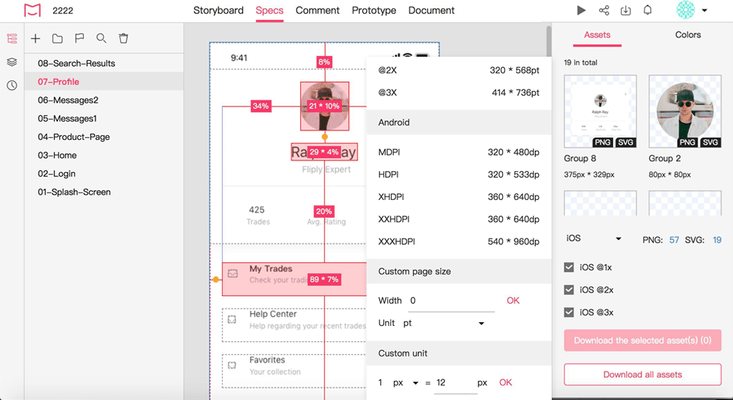
Improved the display of layers with shadows on the web after uploading.
Adobe XD plugin
Improved the interface style.
Sketch plugin
Improved the interface style.
Design system
Added support for dragging the right edge of the Project Tree panel to adjust its width.
Improved the linking between projects and design system libraries. Mockplus will redirect developers to the related design system libraries when you click the color or font variables in the Property panel under the Development mode.
Improved the asset search strategy. All assets will be searched by name.
Improved the way to expand and collapse asset groups.
Artboards & online prototyping
Added support for a "Public share" option to share projects. Anyone with this share link can easily access and preview projects and view Storyboards without having to log in.
You can now check recent notifications and requests inside any project without going back to the home page.
Design & interaction
Added a Project Tree panel to help you switch between different pages in Presentation mode.
Added support for switching project editing modes using shortcuts "Alt + 1/2/3/4".
Moved the Pin tool to the first position of the comment tool bar. The Pin tool will now be selected by default for quick use when you enter the Comment mode.
Moved the Text tool to the first position of the markup tool bar. The tool will now be selected by default for quick use when you enter the Review mode.
Added support for selecting and downloading multiple assets by pressing "Shift".
Added support for generating code snippets of assets. You can also download all those code snippets in one click.
Improved the responding of shortcut keys.
Project Tree
Added support for selecting and downloading multiple pages on the Project Tree.
Improved page searching. The searched pages inside a page group will now also be shown.
Preview
Added support for a new way to show the Project Tree panel on the left side.
Team management
Improved the interface to remove a member. You can now transfer the projects of the removed member to any other team members with ease.
Improved the interface to transfer a team from one member to another.
Improved the process of transferring projects and project folders after removing a member.
Project management
On the project home page, you can now open or edit a project on a new window.
Added support for a quick start guide to help new users get started with Mockplus in minutes.
Improved the empty state of the popup window that helps you manage project members.
Added support for a right-click menu to set up your project. You can now click any part of the project cover to expand the setting menus.
Added support for changing project owner. You can now select a new owner to take over all related projects or project folders with ease.
Improved the returning strategy of project folders. Now, you will return back to the parental project folder, not the home page, when you are trying to go back within a project.
Added a new prompt to remind users when trying to delete a project that still contains shared assets.
Improved the adaptive style of the project list on the home page.
수정사항
PS plugin
Fixed: Colors may not be correctly shown after uploading.
Fixed: The font weight property may not be correctly recognized.
Fixed: The undo command not working issue on Photoshop when using our plugin.
Fixed: Layers may be incorrectly positioned after uploading.
Fixed: You may fail to create a sibling group for an existing child group.
Fixed: The downloaded assets may be unexpectedly stretched.
Adobe XD plugin
Fixed: You may fail to create a sibling group for an existing child group.
Sketch plugin
Fixed: You may fail to create a sibling group for an existing child group.
Design system
Fixed: The asset description words may jump when trying to edit them in the editing mode.
Fixed: Sketch plugin may folder your asset group instead when trying to add an asset group.
Design & interaction
Fixed: The code snippets for the rounded rectangle's corner radius may not be precisely generated.
Document
Fixed: Pin comments may not be precisely positioned after zooming in or out of the document.
Fixed: When you try to number your list, a dot next to the number may be lost.
Project Tree
Fixed: The number of pages may be incorrectly shown on the page group.
Fixed: The name of the downloaded assets may contain underlines.
Fixed: The thumbnail of the deleted page may still exist after you've restored it back from Recycle Bin.
Preview
Fixed: The hotspot may flash when previewing Axure prototypes and clicking the hotspot.
Fixed: When you are previewing projects on mobiles and clicking a hotspot, the other hotspots may also flash.