Released: Apr 7, 2026
V9.1 버젼 업데이트
기능
Core Updates
- Streamlined Collaboration with mentions - Communication within the review process is now more direct and responsive. You can now pull specific teammates into a conversation exactly where they are needed using mentions. Key improvements
- Mentioned User Selection - Simply type the @ symbol in any comment or reply to trigger a searchable list of collaborators, then select the desired user to mention.
- Instant Email Notifications - Once mentioned, the collaborator receives an automated email notification containing your message, ensuring they never miss a critical update.
- Direct link to comments - Each notification includes a direct link that takes the user straight to the specific message within the review task, eliminating the need to hunt through documents for context.
- New Review Task Dashboard - Navigating complex review cycles just got easier. A dedicated Dashboard view for review tasks was introduced, providing a centralized hub for tracking progress and context at a glance. Key improvements
- Detailed Task Descriptions - Move beyond simple titles. You can now provide a full description for each task, ensuring all reviewers understand the specific goals and context of the proposed changes.
- Consolidated Task Metadata - Instantly view task information such as, Status information, Due Date (with a countdown), task Owners, and, in case of tasks created within a project, the task Source consisting of project and branch information.
- File Management - Access and manage all associated files directly from the dashboard, with action buttons to access various actions, including adding new files to the task.
- Real-time Review Status - A new sidebar provides a live status of reviewers activity, showing the reviewer status information, so you can easily see who Finalized their review, who is still In Progress, and who did not yet access the task and their status is Pending.
- Better Onboarding Experience with New Project Templates - When creating a sample project, you can use the new carousel to choose from a variety of project templates to help you get started:
- Empty project to start from scratch.
- DITA Software Documentation starter project.
- Circle Chat Demo - A sample software documentation project showcasing reuse and profiling.
- Hydraulic Gear Pump - A sample hardware documentation project showcasing the use of an image map.
- Sunny Sky Demo - A sample API documentation project showcasing the inclusion of an OpenAPI JSON file in a DITA XML project.
Updated Visual Editor
- Content Fusion's visual editor was updated to integrate the latest changes implemented in Oxygen XML Web Author 28.1.0.
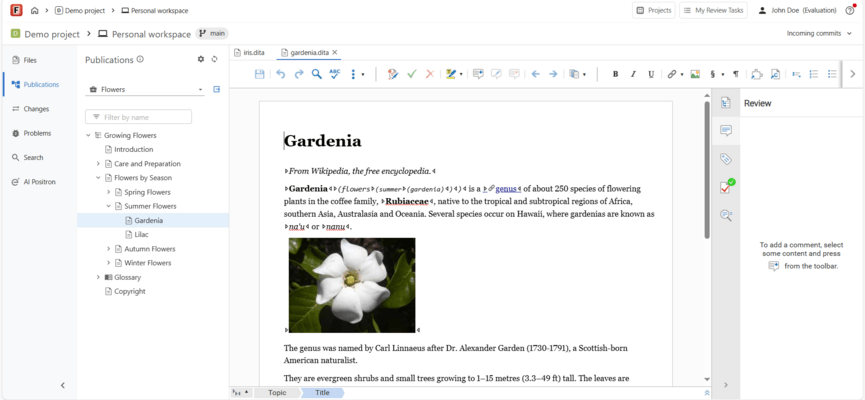
- Improved Table & Content Flagging Support - Table support was updated to support large DITA tables, by implementing "sticky" headers, keeping table headers visible while you scroll. Tables with many rows use an internal scrollbar so you can navigate long tables without losing context. You can now insert multiple empty rows or columns at once in tables from DITA, DocBook, XHTML, and TEI documents. You can now easily distinguish profiled content by applying colors and text styles using DITAVAL flagging. These styles are rendered directly in the visual editor and DITA Map pane according to your active DITAVAL file.
- Built-in S1000D Support - You can now work with S1000D issue 4.x content using built-in support for editing and visual authoring, including templates, and Smart Paste. Key functionality
- Editing and Validation - Edit S1000D documents with schema-guided editing, validation, and content completion support.
- Visual Editing with Dedicated Styles and Actions - Visually edit S1000D documents and switch between full-width, print preview, or large-font styles. Use dedicated actions to insert and edit tables, lists, and text styling.
- Smart Paste - Paste content from web browsers or Word documents into S1000D documents while preserving the structure and formatting.
Enhanced AI-Assisted Authoring
- You can access AI features via the optional Oxygen AI Positron for Content Fusion plugin. It streamlines content creation and enhances productivity with the ability to use AI Agents and the various built-in AI actions. This release integrates all the latest updates from AI Positron, including the following features:
- Planner AI Agent - You can select the newly-introduced Planner agent as your current chat mode to handle complex, token-intensive operations (for example, you could ask the AI to translate all files in the current folder, find all conrefs and replace them with conkeyrefs in userguide.ditamap, or update the short descriptions in all topics). The Planner AI agent explores your project, proposes a multi-step plan, and after your approval, delegates each step to the most suitable AI agent for that specific task, such as:
- Agent - A general-purpose project assistant. You can chat with it about your project, set goals, or give instructions. It proposes changes, and you decide what to keep.
- DITA Agent - A specialized agent for DITA XML projects. It can explore the project, help with complex DITA tasks, propose a plan, and make project-wide changes on your behalf.
- Your custom agent - You can now define new agents by creating new AI actions that contain the "output-action": "agentic" property.
- Smarter Context & Vision - More context information is available when you interact with the AI. The chat now automatically includes additional information about your environment and editing context, such as the application version, current date, and caret or selection data. Having richer contextual information leads to higher-quality AI responses. The structure and styles for attached Word and PDF documents are preserved when attaching them in the chat. Their internal structure (headings, lists, tables, code blocks) and styling (bold, italic) are sent to the AI so that it better understands the content of the document. You can create AI actions with vision support, allowing a custom-defined AI action to send both content and referenced images to the LLM, by using the "input-type": "markup-with-images" JSON property.
Other Improvements
- Project & Task Management
- Granular Access Control - Introduced Owner and Member roles for Projects (now, only Owners can modify project-level settings).
- Publication Context - The publication context is now automatically preserved when creating review tasks directly from a project.
- Streamlined Reviewer Invitations - A new Add Reviewers button in the Review Status drop-down provides instant access to the Share settings.
- User Interface
- Refined Headers - The application and context headers have been redesigned to reduce clutter and maximize workspace.
- Focused Editing - Support for collapsing the left side-view allows you to focus entirely on the editor.
- Optimized Search - A redesigned search side-view now includes a dedicated pop-over for advanced search syntax.
- Review & Activity Side-Views
- Rich Email Notifications - Review task emails now include the full text of review comments directly in the notification.
- Dedicated Review View - Review items have moved from a sub-tab in the Search page to their own Review side-view, featuring improved filtering with a Mentioning Me filter for comments.
- Continuous Feedback - The Task Activity side-view now keeps the message input visible at all times, with automated notifications sent to all task collaborators when a new message is added.
- Activity Filtering - New filters in the Task Activity view allow you to quickly isolate the entries that are most relevant to you.