Remote Desktop Manager 2019.1.20
Released: May 14, 2019
2019.1.20 버젼 업데이트
기능
- New Features
- Added SSH session recording.
- Added 2FA (Google Auth, Microsoft Auth) for 1Password Web.
- Added a VPN tab to the data source configuration allowing you to force a connection to a VPN before starting the data source.
- Added an embedded option to both VMRC and VMware Console entries.
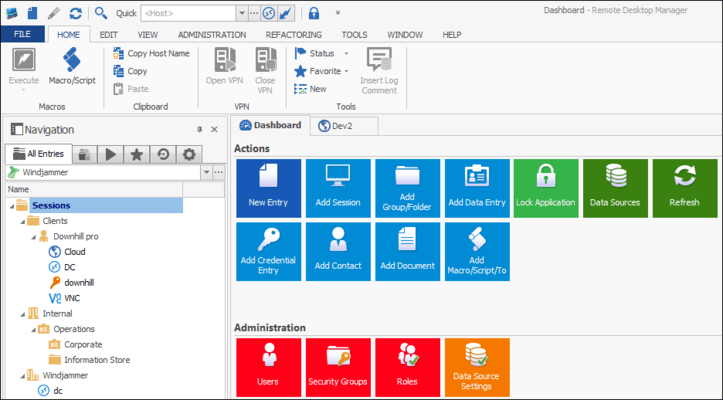
- Added Black theme UI.
- Added Cryptocurrency Cold Storage entry type.
- Added Keeper credential entry.
- Added multi vault search.
- Added session recording (RDP, VNC, Wayk and ARD).
- Added Smart Folder feature.
- Added support for VNC vino's auth 18 (TLS).
- Added VPN Link option to open a VPN depending on OS.
- Major UI improvement with SVG images.
- Improvements
- Improved the mRemoteNG password import.
- Improvements to Smart Folder tag display and adding the "Require all tags" checkbox.
- Added option to SSH terminal for "Skip environment variable setup.
- Added option to validate only against domain context with "integrated security lock".
- Added possibility to include ticket number in the close comment of a session and in the "insert log" prompt.
- Added Tab coloring (unselected) setting.
- Added the possibility to filter by templates group name when adding a new entry.
- Changed MACHINE_DOMAIN variable to support folder prefixes.
- Updated AWS integration.
- Updated embedded Chrome.
- $APPLICATION_NAME$ variable now takes into account the override application name option.
- Added "ClearTextPrivateKeyData" property for imports.
- Added "Contact" and "Document" tabs in checkouts reports.
- Added "Show sub-connections" checkbox in the smart folder properties and removed it from the smart folder dashboard.
- Added 2FA challenge support for BeyondTrust entries (console + connection).
- Added a button to optimize all repositories in pack data source.
- Added a data source setting to disable shortcuts.
- Added a debug icon in the statusbar when the debug logs are enabled.
- Added a debug image in the status bar when the debug logs are enabled.
- Added a full refresh for IE (Ctrl+Refresh).
- Added a host choice of "Same as template host" to the active directory synchronizer settings.
- Added a log when the deleted entry history, the activity logs or the entry history are cleaned.
- Added a new feature "Copy Connection String (prompt)" with selected credentials.
- Added a search bar to the batch execute prompt for hosts of macro entry.
- Added a setting to automatically execute the quick connect on template selection.
- Added a treeview tooltip with the Checkout or Running information.
- Added Amazon AWS and S3 missing regions.
- Added an option to set a delay to open a connection when available.
- Added autoscroll option to continuous ping and ctrl+break.
- Added basic support for Tigervnc's x509 authentication types.
- Added Batch Edit recording session.
- Added Bitwarden custom url.
- Added Bitwarden multiple MFA support.
- Added certificate support for VNC.
- Added checkbox to the quick connect window to "Close after connect".
- Added Close tab with middle click.
- Added complete refresh to IE refresh button.
- Added ConnectionLog.TicketNumber field in SQlite.
- Added credential and folder entry type to the RoyalTS import. Added inherited and credential selection for entries directly from the import.
- Added custom user password policy settings in datasource settings.
- Added default Keyboard Layout option in Options.
- Added filter option "Include Empty Folders".
- Added free layout mode to organize the docked tabbed pages.
- Added handling of "My account settings" to Teampass entry.
- Added log path to Wayk now entry.
- Added log support for serial entry type.
- Added Mask information (secure) option to Custom Controls in Web Browser session.
- Added miscellaneous section in the Add dialog.
- Added missing Password history to SCP and merged tabs.
- Added multi vault search to filter.
- Added my account settings to Dashlane.
- Added option to choose documentation editor font family and size.
- Added password length in password analyser and password complexity report.
- Added possibility to edit RDP Type in a batch edit.
- Added pre execution pause to script and command events.
- Added Private Vault support in multi-vault search.
- Added prompt for external monitor option.
- Added prompt for name for session recording + fixed issue with variables + other various fixes.
- Added public key property in SSH terminal.
- Added QR code to the View Password form of an OTP entry.
- Added scroll wheel support in application/alternate screen mode in Terminal.
- Added scrollbars to dashboards.
- Added setting to disable certificate revocation check.
- Added Splashtop add-on.
- Added support for bracketed paste in Terminal.
- Added support for Tigervnc's x509 authentication types.
- Added the field "Version" in the tab: Information->General.
- Added the fields "Manufacturer" and "Model Information" in the Hardware tab.
- Added the possibility to import multiple files from menu.
- Added the possibility to Open (Without VPN) when selecting multiple connections.
- Added the possibility to open browser in incognito mode for WebSite entry.
- Added the possibility to Quick Connect to multiple servers by using ; character.
- Added the possibility to start a macro/script/tool entry by double clicking it.
- Added the possibility to Switch repository and Open.
- Added unicode combining characters support in Terminal.
- Added user and repository images.
- Added vault image in the UI.
- Added warning messages when doing "close all" and "close all except" on the tabs.
- Added Wayk now Prefer relay and UniqueID.
- Added Windows Admin Center entry.
- Always show "use office 365" in DPS datasource options.
- Changed the default sort column in password history.
- Changed the View Password to be disabled by default for non administrators.
- Changed the View Password to not allowed by default for non administrator.
- Changed the way the default check out mode is displayed in the connection properties and the root settings.
- Changed VMWare sync to use the template credentials no matter what if a template is used. Otherwise, use the sync's credentials.
- Deprecated Login (Account) information entry.
- Deprecated some data source type (Access, FTP, SFTP, S3 and Web).
- Disable autorefresh when there are unsaved changes in the documentation.
- Disabled the possibility to add the character ; in the folder name when shortcuts are disabled.
- Improved the Add dialog with a Misc category.
- Improved the add document workflow.
- Improved the Cloud Account UI.
- Improved the default permission display in Data Source permissions and root permissions.
- Improved the document's read only handling.
- Improved the RDP display settings for scrollbar.
- Improved the recent navigation.
- Improved the Reveal password with the View Password permission.
- Improved the tooltip for the embedded tab.
- Made the expiration date required for certificate type documents.
- Moved drag and drop setting into the Setting section and removed the inheritance from the Role.
- New Add category (document merged, folder, General section (RDP, SSH), merge Login Account - Login Web) and remove Import.
- No longer allow "." in MySQL and MariaDB user username.
- Now save the proxy settings properly in SFTP.
- Now show activity logs report if the non-admin user has permission.
- Removed powercli from VMwareSynchronizer.
- Rename repository for vault.
- Renamed Login (Web) for website.
- Renamed repository for vault.
- Reworked all the add-ons.
- Reworked the Recent UI.
- Reworked the Wayk integration.
- Spiceworks sync now lets you use no template. This will create RDP entries by default.
- Terminal rendering corrections.
- UI improvements.
- Updated Essential Objects (Chrome embedded). Fixes a few client issues we've gotten, including crash when downloading as non-elevated and Windows 1809 issue.
- Updated Mateso Password Safe's API and used new methods provided by the API to query the information in a more reliable way.
- Updated roboform to fix a possible issue with vault sizes.
- Updated ScreenConnect extension to fix potential issue with the display name.
- Updated the Wayk embedded client.
- VMWare integration without PowerCLI.
- VPNs now have external close comment set to automatic.
- Wayk embedded improvements: - Default friendly name - Fixed the "auto" zoom mode - Made the "scaled" option activate the "auto" zoom mode.
수정사항
- Fixed issue with masterkey prompt in XML-based datasources.
- Fixed the "include credentials" checkbox when trying to export entries from private vault.
- Fixed Always connect with VPN issue for NetExtender and FortiClient add-ons.
- Fixed issue with special characters in macros for the terminal.
- Fixed issue with the tab group's navigation panel not supporting multi selection in the contextual menu.
- Removed the prompt for comment on open prompt when doing a "Copy" action.
- Changed check for username in wayk settings.
- Check for update button now works properly in "once a month" mode.
- Correction of the alt gr handling in the terminal.
- DPS - Can't delete a repository if an entry is checked out.
- DPS offline fixes.
- Fixed "My Account Settings" not saved for non-admin.
- Fixed a bug where QuickConnect would not open multiple servers when pressing enter.
- Fixed a bug where users could batch edit credential to inherited.
- Fixed a possible issue with 1Password web.
- Fixed a possible memory leak with the thumbnails.
- Fixed a shortcut issue with the Close.
- Fixed Advanced Search connection type not listing sub connection types.
- Fixed advanced search wasn't showing sub connection when searching by Folder name.
- Fixed an error when disconnecting SFTP SCP.
- Fixed an issue where the always ask password prompt of a credential would prompt when saving the credential into another entry's properties.
- Fixed an issue with DPS and update documentation.
- Fixed an issue with keyboard layout in VNC/ARD.
- Fixed an issue with the DPS Windows authentication.
- Fixed an issue with the dynamic port not being used (FileZilla).
- Fixed an issue with Yubikey.
- Fixed automatic check out not working on the credential entry if it's selected in the "Open with paramters" menu.
- Fixed Bitwarden browse issue when changing host mode.
- Fixed connection override not working for management tools credentials when doing "Load from inventory" in the properties of a session.
- Fixed credential selection showing all credentials from main vault without restriction when in private vault.
- Fixed delete multiple documentation entry at the same time.
- Fixed deleted connections weren't removed from favorites.
- Fixed domain folder inheritance issue.
- Fixed error when disconnecting SFTP SCP.
- Fixed export context menu in Private Vault.
- Fixed export rights.
- Fixed filter prompt when locked.
- Fixed Get-RDMRepository cmdlet return nothing if we connect on another data source.
- Fixed Get-RDMSession doesn't trigger an error message using -GroupName switch.
- Fixed Google Drive data source when existing entries disappearing on refresh if network lost.
- Fixed issue where the "session name" setting of an Active Directory could be set to "Same as template host".
- Fixed issue where the always ask password prompt of a credential would prompt when saving the credential into another entry's properties.
- Fixed issue where you could assign users to AD or 365 roles in the "Assign users to role".
- Fixed issue with "My account settings" prompt for DPS credential.
- Fixed issue with "Open with parameters" -> "Prompt for credential" not doing it's logs and not resolving if it's a complex credential.
- Fixed issue with $PASSWORD$ variable.
- Fixed issue with a credential entry not handling it's check out settings when used from a session using "prompt on connection".
- Fixed issue with active directory not working when no destination folder is specified and the setting "Create folders from OU/containers" is activated.
- Fixed issue with all XML type datasources becoming unresponsive after using a playlist from the play list management form.
- Fixed issue with arrows not browsing through an "Auto hide" treeview when a filter is applied.
- Fixed issue with automatic check in not working when closing a session using external mode.
- Fixed issue with context menu of RDM's browser tabbed view opening above the browser's right click menu.
- Fixed issue with disappearing credentials when moving in private vault.
- Fixed issue with double prompt for comment with SSH in VPN.
- Fixed issue with DPS & offline mode when renaming folders.
- Fixed issue with flag as closed (in opened connections (global/local) not working when using DPS in RDM.
- Fixed issue with host entry type and subconnections.
- Fixed issue with internet explorer automatic refresh feature causing the focus to be switched continuously between all web entries.
- Fixed issue with password list from the private vault prompting for credential (on view password) when you already selected one in your user/local specific settings.
- Fixed issue with SCP deleting folders.
- Fixed issue with session recording default file name.
- Fixed issue with the "Entries (.RDM,.PVM)" synchronizer.
- Fixed issue with the Dashboard not opening the proper entries when they were selected from a search result (filter).
- Fixed message being overridden when changing status.
- Fixed multiple issues happening in the "view password" form of a One Time Password entry if the key is invalid.
- Fixed multiple issues with SCP.
- Fixed null reference exception WebDAV list double click.
- Fixed open and close comment when keeping open after disconnect.
- Fixed option extension issue with Keeper remember me.
- Fixed possible issue with renaming folders while in offline mode with DPS data source.
- Fixed possible null reference exception issue when exporting attachments in a DODB data source.
- Fixed Quick Connect reconnect.
- Fixed RDP focus not properly restored when the user clicks on an empty area of the navigation list.
- Fixed reconect with deleted connection.
- Fixed reconnect possible security flaw using keep open on disconnect.
- Fixed report auto export CSV.
- Fixed resolving of password/username of OnePassword entry not working if keyID is not in the entry json.
- Fixed S3 not loading when there's a broken bucket.
- Fixed select custom image issue.
- Fixed tab page colors.
- Fixed tags list didn't contain sub-connections tags.
- Fixed the alternate command shell not being imported from RoyalTS.
- Fixed the expected behavior of the Software Licenses report.
- Fixed the focus loss on F10 in Terminal.
- Fixed the QR code.
- Fixed thumbnail capture when rdp screen size is set to fullscreen.
- Fixed UI issue: Ticket number not shown in the log.
- Fixed UI issues in SCP entry.
- Fixed undocked issue with chrome if the find window was shown.
- Fixed Wayk Now logs.
- Fixed Webdav concerning some picky serfvers.
- Fixed WebDAV datasource leading slash.
- FTP bug fixes, now trap one more case on connection for blocked IPs.
- Removed fonts from option search.
- UI fixes.