








Offizieller Lieferant
Als offizieller und autorisierter Distributor beliefern wir Sie mit legitimen Lizenzen direkt von mehr als 200 Softwareherstellern.
Sehen Sie alle unsere Marken.

ComponentSpace is a software company specializing in developer tools for the Microsoft platform, particularly focused on secure single sign-on (SSO) solutions. Founded in 1995, they boast one of the world's leading deployments of SAML libraries, enabling developers to easily integrate secure login experiences leveraging SAML and OpenID Connect into their ASP.NET and ASP.NET Core applications.
ComponentSpace's recent product releases have added support for .NET 8 with example projects specifically targeting the latest version of Microsoft's .NET 8 framework. ComponentSpace components can now seamlessly integrate with applications developed using the latest version of the .NET framework, ensuring that developers can leverage the newest features and improvements provided by .NET 8 without worrying about compatibility issues.
.NET 8 support and example projects have been added to the following ComponentSpace products:
ComponentSpace products are licensed per developer. Licenses are perpetual and royalty-free and are available for single developers, four developers, and sites. Source Code is available as an option for Site Licenses. Priority Support is also available which provides enhanced technical support and software updates for 1 year. For more information see:

Infragistics Ultimate offers a comprehensive library of enterprise-grade, high-performance grids, charts, and other UI controls, plus visual configuration tooling, rapid prototyping, and usability testing. It comes with controls for Angular, React, jQuery, Web Components, Blazor, ASP.NET MVC, ASP.NET Core, ASP.NET Web Forms, Windows Forms, WPF and Xamarin.
Infragistics Ultimate 23.2 includes the updated Ignite UI for Blazor Data Grid and Blazor Table which are specifically crafted to effectively manage substantial datasets while maintaining essential interactive capabilities. They offer features such as virtualization for enhanced performance, row grouping and pinning, built-in columns with functionalities like filtering, moving, resizing, and sorting, as well as responsive layout support and collapsible group headers. These components are designed to cater to the practical needs of developers working with Blazor, providing them with reliable tools for efficiently handling large volumes of data within their applications.
Infragistics Ultimate is licensed per developer and is available as a Perpetual License with a 1, 2 or 3 year support and maintenance subscription. See our Infragistics Ultimate licensing page for full details.
The Ignite UI for Blazor Data Grid is available in the following products:
GroupDocs.Metadata for .NET is a powerful API that grants developers granular control over the hidden information within various document formats, like Word, Excel, PDFs, and even images and audio. It seamlessly enables reading, editing, and removal of metadata properties, empowering you to organize, categorize, and extract valuable insights from your file collection with ease. This metadata manipulation capability unlocks enhanced document searchability, automated classification, and streamlined information retrieval, boosting the efficiency and organization of your data ecosystem.
The GroupDocs.Metadata for .NET V24.3 release adds support several GIS formats including SHP, GEOJSON, TOPOJSON, GML, OSM, KML and GPX. This allows you to extract and analyze geospatial data embedded within these document formats such as property boundaries, transportation networks, or environmental features.
To see a full list of what's new in V24.3, see our release notes.
GroupDocs.Metadata for .NET is offered as Developer Small Business, Developer OEM, Site Small Business, and Site OEM licenses catering to a range of business needs. Licenses are perpetual, and include 1 year of support and maintenance. Subscription renewals are also available. See our GroupDocs.Metadata for .NET licensing page for full details.
GroupDocs.Metadata for .NET is available in the following products:
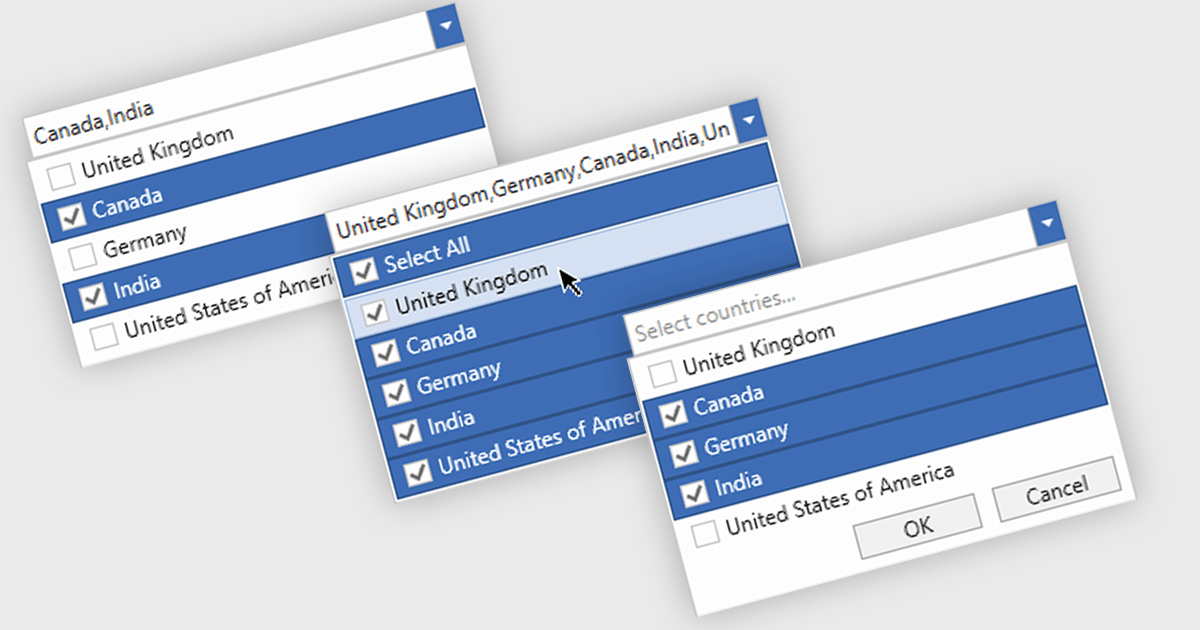
Checked combobox controls are data editor user interface elements that allow users to select multiple options from a dropdown list while visually indicating their choices through checkboxes. These controls provide developers with a convenient way to implement multi-select functionality within their applications, enhancing the user experience by offering intuitive selection methods. By integrating checked combobox controls, developers can streamline data entry processes, improve usability, and increase productivity within their software applications, ultimately leading to more efficient and user-friendly interfaces.
Many .NET WPF Data Editor collections contain checked combobox components including:
For an in-depth analysis of features and price, visit our comparison of .NET WPF Data Editors.
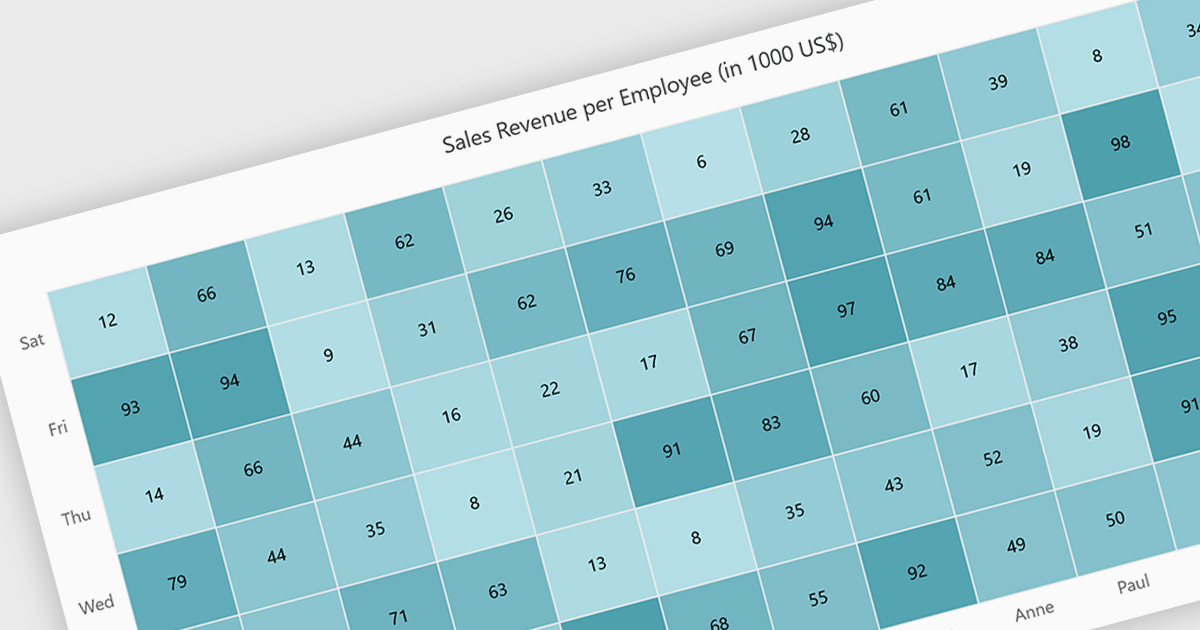
A heatmap is a data visualization tool that uses color intensity to represent magnitude within a dataset. This allows for quick identification of patterns and trends across two variables, depicted on the map's axes. Heatmaps are valuable for analyzing geographic data, user website interaction, and any other scenario where you need to visually grasp the distribution of data points.
Several Blazor chart controls offer Heatmaps including:
For an in-depth analysis of features and price, visit our Blazor chart controls comparison.





Tel.: (888) 850 9911
Fax: +1 770 250 6199


