MadCap Flare 2016 r2

Verbesserungen bei der Bildfixierung, dem internen Text-Editor, der oberen Navigationsausgabe und der Erstellung von Prozessereignissen.
Oktober 28, 2016
Neue Version

Funktionen

  • Image Pinning - You can now pin your favorite images, making them easily and quickly accessible for future use.
  • Internal Text Editor - Manage Font Size - Three new buttons in the local toolbar of the Internal Text Editor let you manage (increase, decrease, reset) the font size. These options change the font size in the editor only, making it easier to see the text as you work. These options do not change the size of the actual content, affecting the output.
  • Previous/Next Buttons in Top Navigation Output - You can add Previous and Next buttons to toolbars used in HTML5 Top Navigation and skinless output. This lets users quickly navigate to the previous or next topic in the table of contents file.
  • Targets - Pre/Post Build Processes - In the Target Editor, there’s a new tab called “Build Events.” This lets you run command line events before or after the target is generated.
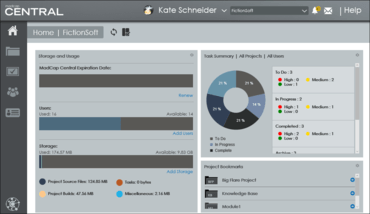
  • MadCap Central Integration - MadCap Central is a cloud-based platform that lets you plan, track, and manage the processes, content, and teams that are at the heart of your organization. You can store copies of your Flare projects in MadCap Central, continue to work on them locally in Flare, and keep both sets of copies in sync.
Store copies of your Flare projects in MadCap Central.

MadCap Flare

Dokumentation für alle Zielgruppen, Sprachen oder Formate.

Sie haben eine Frage?

Live-Chat mit unseren MadCap Software-Lizenzierungs-Spezialisten.