ComponentOne Studio for Xamarin 2019 v1

Integriert neue Animations- und Exportfunktionen in FlexGrid sowie Updates auf Radial Gauge, Input-Steuerlemente und C1 Icon.
März 22, 2019
Neue Version

Funktionen

  • New ComponentOne Control Panel - provides a new way to install, update, license, and maintain your ComponentOne libraries. It also provides fast access to samples, and support.
  • Adds support for Microsoft Visual Studio 2019.
  • FlexGrid Animations
    • New animations have been added to the grid, including a rip animation when a user long presses over a column, as well as a flowing repositioning animation that triggers as the user drags a column or row to reorient it.
    • A new export feature allows you to easily export your data to text, CSV, and formatted HTML.
  • Radial Gauge - Added a property that allows you to reverse the Radial Gauge’s direction. Rather than draw clockwise for 0 to 360, you can now draw counter clockwise from 360 to 0.
  • Input - All Input controls now support Right To Left (RTL Support). This is important for localizing certain languages, such as Arabic. Layout direction can be changed by setting FlowDirection for any Input control.
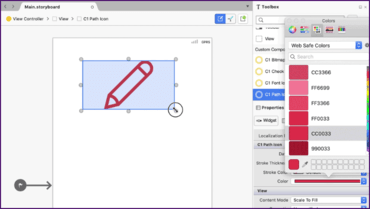
  • C1Icon - Added improved support for cross-platform vector graphics via C1PathIcon. Using this path, data can easily be resized or colored within your app.
C1Icon improves support for cross-platform vector graphics.

ComponentOne Studio for Xamarin

Codieren Sie einmal in C# und XAML für alle nativen mobilen Geräte.

Sie haben eine Frage?

Live-Chat mit unseren MESCIUS (formerly GrapeCity)-Lizenzierungs-Spezialisten.