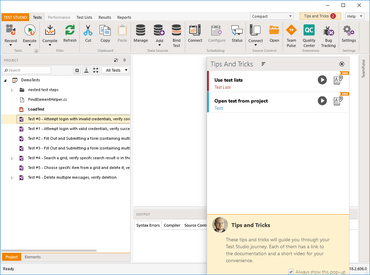
Integriert die Unterstützung für Internet-Komponenten wie "Shadow DOM".
April 2, 2020
Neue Version
Funktionen
- Executive Dashboard Reports. You can create, review and share custom automation result reports.
- Web components such as "Shadow DOM" are now supported. There is a new option in Project Settings to control this behavior.
- UX changes. Better usability and quality of life improvements in Test Studio's main IDE. The 'Welcome Screen', IDE 'Ribbon' and 'Project' explorer have been improved for faster end user interactions.
- Browser extensions for Firefox, Chrome and Edge Chromium have been updated.
- Salesforce apps using 'Shadow DOM' as underlying technology are now supported.
- Scheduling Setup UI improvements. The status of the connected Storage Service is displayed when applying new configuration.
Fehlerkorrekturen
- Scheduling: Exception during remote execution in ArtOfTest.Runner.exe with dialog handling.
- Browsers: Firefox process not being killed if you abort test quick execution.
- Browsers: 'Delete Cookie' not working in Chrome and Firefox.
- Dialogs: Log-on dialog is not handled in new FF73.
- Dialogs: Dialog handling steps are failing if you execute "From Here" and "Run Selected" against a Test as Step.
- Dialogs: Download dialog in Internet Explorer does not close 'Download completed' footer.
- Dialogs: Unexpected dialogs not being handled in Chrome during test list execution.
- Recording: Highlight with JS Recorders does not work properly in some specific site.
- Recording: Recording dialogs in JS browsers after "Run to here" is not working.
- Recording: Some in project elements are not created as expected for specific DOM objects when using the step builder in the recorder.
- Recording: Recording of drag and drop actions is not working in IE.
- Recording: Internet explorer dialog recording will stop working after you close a pop-up.
- Executive Dashboard: Added ability to resize column size for individual test list run results.
- Executive Dashboard: Results Rerun status is wrong - shows IsPassed value.
- Execution: Generic HTML table verify 'columnsCount' compare type 'GreaterThan' or 'LessThan' is not working.
- Scheduling: Automatic upload to storage does not respect scheduled list content.
- Scheduling: Scheduler configuration crashing if you give it a location with no storage server for executive dashboard storage.
- ProjectExplorer: Deleting folder with test in it which was added from windows explorer crashes Test Studio.
- ProjectExplorer: Deleting all tests while some element is "Open for edit" does not close the element's document.
- TestExplorer: Drag and drop steps cannot be deleted if created from Step Builder.
- StepFailureDetails: Resolve Failure tab is shrunk in some environments.
- VisualStudio: New tests and test lists not being immediately loaded in the VisualStudio 2019 v.16.5 test explorer after build.
- Translators: Enhanced KendoListBox (jQuery) translator. Added count of list items('li') and count of selected items.
- Translators: Recording of KendoTreeView (jQuery) nodeSelect is not working.
- Translators: KendoWindow (jQuery) 'isMaximized' does not work.
- Translators: KendoTreeNode (jQuery) actions and verification are not available if the tree node is part of PanelBar.
- Translators: KendoListView (jQuery) now has select by index as an option.
- Translators: KendoListView (jQuery) added friendly exception when you attempt to select item where selection is not allowed.
- Translators: KendoListBox (jQuery) recorder will create wrong search query for selected item.
- Translators: KendoListBox (jQuery) step should have 'SelectionType' exposed in the in-line properties of the step.
- Translators: KendoDropDownList (jQuery) 'select' action is not recorded.
- Translators: KendoGrid (jQuery) clicks on 0 column cells are recorded wrong.
- Translators: KendoGrid (jQuery) action steps will not record images.
- Translators: KendoInput (jQuery) text is entered in the wrong element if you have more than one instance in the same page.
- Translators: KendoInput (jQuery) runtime input in auto complete box will fail.
- Translators: KendoInput (jQuery) set text step will not work if the input element has focus and active cursor.
- Translators: KendoInput (jQuery) step not working as expected for 'DateInput' type.
- Translators: Kendo NumericTextBox (jQuery) incremental increase of numeric value by button click will record toggle.
- Translators: FilterMenu (jQuery) toggle action records step with the wrong description.
- Translators: FilterMenu (jQuery) crashing Test Studio if opened while highlighting is enabled.
- Translators: Verification in Blazor Time Picker will fail if there is Cyrillic in the DateTime.
- Translators: TelerikBlazorDateInput value will always return 1/1/0001 12:00:00 AM no matter what the actual value is.
- Translators: Blazor Date type controls will fail in execution.
- Translators: Blazor grid is not recognized during recording.
- Test Studio for APIs: JSON 'isEqual' verification always returns 'false'.
- Test Studio for APIs: Crashes in some verification cases.
- Changes
- UI Split: Separate start-ups for Test Studio and Test Studio for APIs. Desktop shortcuts and welcome screens are now different.
- All delete buttons in product are now changed to trash bin icons.
- MongoDB: The minimum required version of MongoDB Server is now 3.6.
- Important Notification Regarding Mobile Testing Discontinuation: After thoughtful consideration and based on user feedback, Telerik have decided to revise their approach to mobile testing and shift away from the native/hybrid app focus by discontinuing their Mobile testing solution in its current state.
Telerik Test Studio Web & Desktop
Automatisiertes Testen, das einfach funktioniert.
Sie haben eine Frage?
Live-Chat mit unseren Telerik-Lizenzierungs-Spezialisten.

Offizieller Händler seit 2018