Blazorise v2.2
Released: Jun 4, 2026
Updates in v2.2
Funktionen
- Added SVG Charts
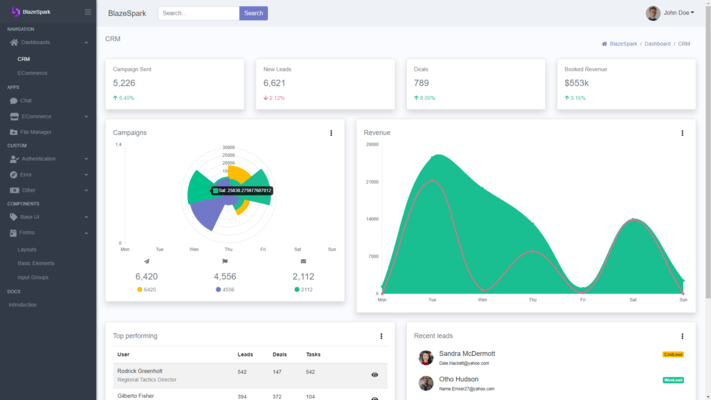
- The new charting system supports a wide range of chart types, including line, area, bar, column, pie, doughnut, radar, polar area, scatter, bubble, and mixed charts. Charts can be configured either declaratively through child components or programmatically through data and options models.
- SVG charts include built-in support for features such as titles, legends, tooltips, multiple axes, stacked charts, time axes, custom colors, labels, animations, accessibility metadata, and chart events. SVG Charts also support annotations, data labels, streaming, trendlines, and zoom/pan through an extensible plugin system.
- Streaming support enables live-updating charts with rolling windows, animated scrolling, reverse direction, and continuous data retention for real-time scenarios.
- Added On-Screen Keyboard
- Applications running on kiosks, tablets, and other touch-based devices can now take advantage of a fully integrated On-Screen Keyboard built directly into Blazorise.
- The keyboard can be enabled globally through accessibility options or configured per input with OnScreenKeyboard, and works across a wide range of components including text inputs, numeric inputs, date and time pickers, memos, DataGrid editors, modals, and validation scenarios. Input targeting can also be customized through OnScreenKeyboardInputType.
- The feature supports multiple keyboard layouts, configurable sizing, customizable key styling and templates, special-character rows, Shift handling, punctuation keys, and culture-aware numeric input. It also includes more advanced behaviors such as caret insertion, selected-text replacement, Enter-key handling, automatic scroll adjustment, and live composition support for date and time inputs.
- Added PivotGrid
- When users need to summarize, analyze, and explore large datasets, PivotGrid provides a familiar spreadsheet-style reporting experience directly inside Blazor applications.
- PivotGrid allows records to be grouped by row and column dimensions, calculate aggregate values, and display totals and subtotals in a tabular layout. It supports both local data binding and external data loading, making it suitable for everything from in-memory datasets to large server-driven reporting scenarios.
- The component includes support for paging, row virtualization, expandable groups, totals and subtotals, runtime field selection, and filtering through a built-in field chooser. Custom aggregation logic can be implemented through the Aggregator API, while templates and styling hooks provide full control over headers, cells, and displayed values.
- PivotGrid makes it easy to build interactive reports and data summaries without requiring a separate reporting tool.
- Added Barcode
- Generating QR codes, shipping labels, inventory tags, and other machine-readable identifiers is now easier with the new Blazorise.Barcode extension.
- Whether you're generating shipping labels, inventory tags, product identifiers, or QR codes, the component supports many of the most common barcode and QR code formats, including Code 128, EAN, UPC, QR Code, Data Matrix, PDF417, Aztec, and more.
- It also provides flexible configuration options such as rendering mode, symbol sizing, scale, colors, rotation, value display and alignment, and image padding, allowing precise control over barcode appearance and layout.
- Validation Warning Support
- Not every validation message should prevent users from continuing. The new warning validation state makes it possible to provide guidance and recommendations without treating them as errors.
- With ValidationStatus.Warning and the ValidationWarning component, you can highlight potential issues or recommendations while still letting users continue. This is useful for scenarios like weak password suggestions or optional field guidance where strict validation is not required.
- The new ValidationFeedback component groups all feedback types (None, Warning, Success, and Error) into a single, consistent API, making it easier to manage validation UI.
- TreeView Drag & Drop
- TreeView now supports drag-and-drop reordering, allowing users to reorganize hierarchical data directly within the interface.
- You can enable dragging with Draggable and allow reordering with Reorderable, including inserting nodes before or after others. Built-in behavior handles moving nodes within mutable collections automatically, so basic scenarios work out of the box.
- For more control, you can use CanDragNode and CanDropNode to restrict allowed operations, and NodeDropped to fully customize what happens on drop. If not handled, TreeView falls back to its default move logic.
- The feature includes clear visual drop indicators for inserting before, after, or as a child node, helping users understand where items will be placed.
- Gestures, Carousel, and Animation Improvements
- Several improvements in this release originated from the same effort to make touch-driven interactions feel more natural in Blazorise.
- The journey started with the new Gestures component, which introduces built-in support for swipe, tap, and long-press interactions. Designed for touch-friendly applications, it provides configurable gesture settings and events while integrating cleanly with existing Blazorise components.
- The result is the new Swipeable parameter, allowing users to navigate slides naturally on touch devices without additional markup. Carousel also gained support for custom indicator, navigation button, and caption templates.
- The Animate component has since evolved into a much more capable animation framework, with support for custom animations and easing functions defined in C#, improved visibility-based transitions, and the new AnimatedSize mode for layout-aware animations such as drawers, sidebars, and expandable content.
- Bootstrap 5 Provider Update
- The Bootstrap 5 provider has been updated to Bootstrap 5.3.8.
- This update improves support for newer Bootstrap 5.3 utility classes, including subtle color variants, border utilities, themed badges, alerts, tables, and improved contrast handling. Theming behavior continues to respect LuminanceThreshold, while adding additional contrast fallback logic to improve readability where needed.
- Bootstrap 5 Bar Improvements
- Bootstrap 5 Bar has been refactored to align much more closely with native Bootstrap navigation patterns. Both vertical and horizontal modes now make greater use of standard Bootstrap structures and class names, improving compatibility with custom Bootstrap themes and making the generated markup easier to customize with standard Bootstrap styles.
- Alongside the structural changes, the update includes improvements to sidebar layouts, collapsed navigation, active and hover states, icon alignment, brand and toggler positioning, mobile behavior, and dropdown menu handling.
- These changes result in a navigation experience that feels more consistent with the rest of the Bootstrap ecosystem while preserving the flexibility expected from Blazorise.