SQL Clone Releases
Released: Dec 5, 2018
Updates in 3.0.6
Funktionen
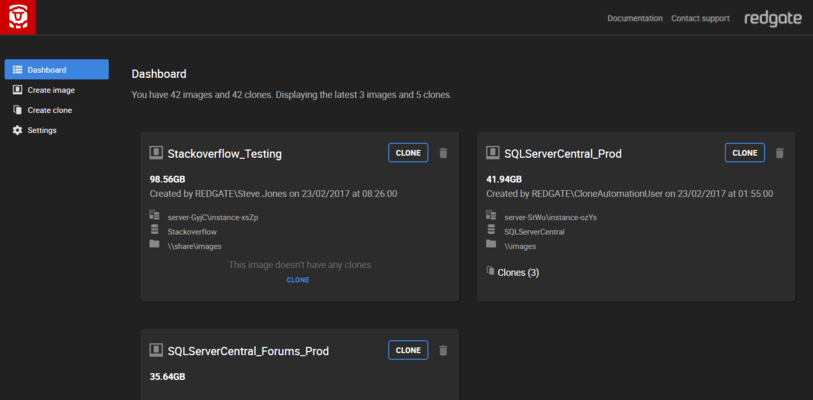
- Added "Images by source" view on the dashboard.
- Added total number of clones and images to dashboard groups.
- Can now create an image from a live database that has replication enabled.
- Integrated with Data Masker vNext to mask images at creation time.
Fehlerkorrekturen
- Limited modifications uploaded through the UI to a maximum of 1MB to avoid browser limits (PowerShell is not affected).
- Fixed an issue where the SQL Clone Agent might incorrectly interpret an image as unavailable, and...
Released: Oct 31, 2018
Updates in 3.0.2
Funktionen
- When an image is stored on a local path rather than a network share, the machine name is shown on the dashboard as well as the path.
Fehlerkorrekturen
- Increased timeout for detaching database.
Released: Oct 25, 2018
Updates in 3.0.1
Funktionen
- Modification script events are now logged during the image creation operation.
- Clicking on the toast notification text now redirects user to the activity page.
- Added filter by 'online' and 'offline' along with reverse condition '!' for clone state to the 'is:' prefix.
- Hovering over truncated text now shows full text.
- A tool tip explaining why you cannot delete the image is shown when hovering over a disabled delete image button on the dashboard.
Fehlerkorrekturen
Released: Oct 15, 2018
Updates in 3.0.0
Funktionen
- Introduces new dashboard and activity view to the web UI to help you better manage your images and clones:
- View your images grouped by file system location and your clones by SQL Server instance, as well as being able to see clones of each image.
- Search for images and clones by name, size, number of clones, and date.
- Order your search results by name, date, or size to find the largest or oldest images and clones.
- Reset clones back to their original state to aid testing scripts and...
Released: Oct 4, 2018
Updates in 2.8.0
Funktionen
- Improved preview dashboard's recent activity widget.
- Added optional parameters -KeepCdc, -BufferCount and -MaxTransferSize to the New-SqlCloneImage cmdlet for creating image from backup.
Fehlerkorrekturen
- Improved error message when trying to create an image from a backup file containing multiple backups.
- Image creation from backup is now correctly canceled when syntax errors exist.
Released: Sep 24, 2018
Updates in 2.7.9
Funktionen
- Clones can now be reset to their initial state from the dashboard.
- Toast notification on activity started, finished and succeeded.
Fehlerkorrekturen
- Fixed an issue where an error was incorrectly shown when deleting an image or clone that failed to create.
- Prevent race conditions between monitoring clones and deleting clones.
Released: Sep 13, 2018
Updates in 2.7.8
Funktionen
- Preview of a new Activity page, showing a history of what's been created and deleted.
Fehlerkorrekturen
- Fixed an issue where temporary instance logins weren't dropped under some error conditions.
- Improved behaviour around cancelling operations.
Released: Jun 25, 2018
Updates in 2.6.4
Funktionen
- PowerShell cmdlets will output a warning when a newer version is installed than is currently running.
- Added Rename-SqlCloneImage cmdlet.
- Sidebar can now expand / collapse, header now displays number of images and clones.
- An OriginDatabaseName SQL variable has been implemented for script runner.
- You can now apply clone modifications from the web UI.
- Added SQLClone_UserName, SQLClone_MachineName, and SQLClone_CloneName SQL variables to clone modification scripts.
- SQL Clone can now be...
Released: Jan 31, 2018
Updates in 2.4.x
Funktionen
- Displays the number of online and unavailable clones of an image on the dashboard.
- Output of SQL scripts used to modify an image are stored on the SQL Clone Server.
- Updated to the latest Visual C++ 2017 redistributable (14.12).
- Current process information is displayed on Web UI while creating image.
- Added origin server and origin database name to the Get-SqlCloneImage cmdlet.
- The "Send feedback" button can be disabled in Settings.
- The -SqlScript parameter on New-SqlCloneImage has been...
Released: Nov 3, 2017
Updates in 2.3.x
Funktionen
- Machines that no longer exist, but still had clones, can now be removed from SQL Clone by passing the
-Forceparameter to the Remove-SqlCloneMachine cmdlet.
- A warning is now given when choosing to create an image using a local path rather than a UNC path, as it will be unaccessible from other machines.
- Machines with agents can now be removed from SQL Clone using the
Remove-SqlCloneMachine cmdlet, once all images and clones created by that machine have been deleted, and the agent is no...