UltraCompare

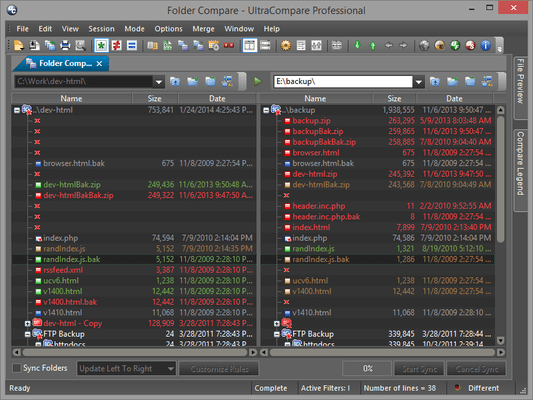
Vergleichen von Dateien, Vergleichen von Ordnern und Zusammenführen von Unterschieden.

Veröffentlicht von UltraEdit
Wird von ComponentSource seit 2013 vertrieben
Version: v2024.x Letzte Aktualisierung: Feb 10, 2025 5.00 Stern Durchschnittliche Bewertung5.00 Stern Durchschnittliche Bewertung5.00 Stern Durchschnittliche Bewertung5.00 Stern Durchschnittliche Bewertung5.00 Stern Durchschnittliche Bewertung (2)

i

Please Note: UltraCompare is now available as part of UltraEdit Core or UltraEdit Enterprise (formerly UltraEdit All Access).
UltraCompare for Windows, Mac and Linux are now included in the License price.

UltraCompare v20.00

Released: Nov 7, 2019

Updates in v20.00

Funktionen

  • Git conflict resolution mode
    • Easily resolve conflicts in new mode.
    • Select lines to keep – local, remote, or both.
    • See result in bottom pane before saving manual merge changes.
    • Optionally finish commit after all conflicts are resolved.
  • Git version diff mode
    • Visually diff any two versions of a file from a Git repository.
    • Diff working copy, index/staged, branch tip, or a previous commit.
    • Shows Git blame info in tooltip for differences.
  • New Git ribbon
    • "Show" group to toggle Git-specific dockable windows.
    • "Repository" group to add, hide, and refresh repositories.
    • "Branch" group to toggle review mode.
    • "File" group to blame, compare versions, and diff or resolve conflicts.
  • "Repositories" window
    • Shows all repositories on system.
    • Lists all local and remote branches for active repository.
    • Git icon color reflects repository state.
    • See active (HEAD) branch.
    • Browse other (non-active) branches.
    • Resolve conflicts or launch version compare.
  • "Branch browser" window
    • See and browse files within repository's active branch.
    • Git icon color reflects working directory state.
    • Sort files by Git status.
    • Diff, blame, copy file path, more.
    • Optionally show modified / conflict files only.
    • Resolve conflicts or launch version compare.
  • "Conflicts" window
    • See files in conflict state from active repository.
    • Launch Git merge mode to manually resolve conflicts.
    • Take all from local / remote.
    • Launch diff or open blame log.
  • Git status overlays in "Explorer" tab of Workspace Manager, with Git context menu.
  • Improved and automated Git mergetool / difftool integration with UC.
  • New Git configuration options.
  • Automatic scanning for Git repositories, with "ignore folder" options in configuration.