Fiddler Everywhere v4.x
Released: Nov 8, 2022
Mises à jour de v4.x
v4.8.0
Updated Oct 10, 2023
Features
- Added option to control zoom level from the application status bar.
- Fiddler will now automatically try to use the Microsoft Edge browser when the "Open Browser" button is clicked, if a Google Chrome installation is not found.
Fixes
- In some cases, the "Save Response body to file" button is missing.
- Wrong screen is shown in some cases after completing the "Filters" wizard on the home screen.
- Error is shown when the user login session has expired instead of simply showing the login screen.
v4.7.1
Updated Oct 2, 2023
Fixes
- Updated third-party dependencies to mitigate CVE-2023-5217.
v4.7.0
Updated Sep 28, 2023
Features
- Added the option to persist pre-configured browser data.
- Added confirmation on Remove all button before clearing the captured sessions in the Live Traffic grid.
- Added the option to choose where to install the root certificate authority for Microsoft Windows.
Fixes
- Unclear error message appears if login endpoints are unreachable.
- Unable to use vertical scroll of sessions in the Live Traffic grid in some cases.
v4.6.2
Updated Sep 19, 2023
Fixes
- Offline support on Windows fails to read the email in some cases.
- Updated third-party dependencies to mitigate CVE-2023-4863.
v4.6.1
Updated Sep 14, 2023
Features
- Improved raw and bulk edit operations in Composer.
- You can now download shared and updated resources after confirmation by the user.
Fixes
- App freezes for a short time on macOS when opening certain websites.
- Performance is slowed down when capturing a high volume of sessions.
v4.6.0
Updated Aug 31, 2023
Features
- Upstream proxy information is now shown in the connection popup at the lower right of the application window.
- Added new vertical Composer layout, which can be switched on/off similar to the session inspectors layout.
Fixes
- Default terminal selection window does not have a default option.
- Link to account page for users with expired old subscriptions.
- Application error when trying to share a rule with manual response and no body.
- Remote Device wizard unable to get the names of the local network adapters in some cases.
v4.5.0
Updated Aug 24, 2023
Features
- Added Remote Device wizard to help mobile and remote computers connect to Fiddler Everywhere.
- Updated HTML page for Fiddler echo service and added new HTML page for testing remote device connectivity.
- You can now automatically disable the option to allow remote computers to reconnect after the application exits.
Fixes
- Do not require Fiddler Root Certificate to be trusted on the local machine in order to connect and inspect traffic from remote devices.
v4.4.2
Updated Aug 4, 2023
Fixes
- Added privacy policy link in the application Help menu.
- Updated link and description for the privacy policy in the Settings window.
v4.4.1
Updated Aug 2, 2023
Features
- Custom columns are now available for all sessions tabs.
- Added an indication for when system proxy has been changed.
- Added new Rules action to updating status code.
Fixes
- Failed to set system proxy on macOS in some cases.
- Monaco editor error description popup doesn't show correctly in some cases.
- Double-click doesn't work in saved sessions.
- Leaked proxy is not cleaned up on Windows machine restart.
v4.4.0
Updated Jul 20, 2023
Features
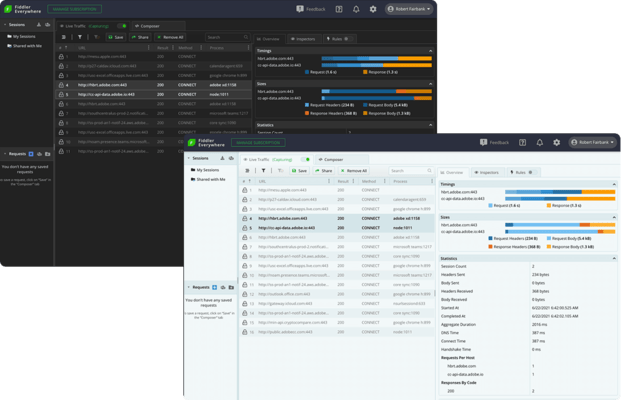
- Added a new application layout where 'Traffic' and 'Composer' functionalities are split.
- Added a Home section which includes user details and feature wizards.
- Moved system proxy toggle in the toolbar below 'Live Traffic'.
- Added informational dialog when the user enables the system proxy manually.
- Added a '+' button in Composer pane for creating new requests.
- Renamed generated certificate authority to Fiddler Everywhere Root Certificate Authority.
- Now shows Fiddler specific page when opening a preconfigured browser.
- Added official support for HTTP/2.
- You can now edit in the Composer Raw tab.
- Added a separate Cookies tab in Composer.
- Removed the option to act as system proxy by default.
- You can now prevent Microsoft Windows restart or shut down when proxy is set.
Fixes
- Fix colors on certificate badge and tooltip for saved sessions.
- Copy as PowerShell option does not work in some cases.
v4.3.2
Updated Jun 27, 2023
Features
- Show warning when the user is unable to set the system proxy.
- Updated Sign In screen.
- Disregard current proxy settings if they are invalid.
- Updated gRPC tooltips.
- Notify users earlier if they are unable to use cloud resources in Offline Mode.
Fixes
- Deleting one session from the Live Traffic grid causes Unexpected Error to the Certificate badge.
- Bypass hosts on macOS are not parsed correctly if they are empty.
- Notification for exported certificate does not indicate the location of export.
- Selection of requests in the grid causes the app to freeze in some cases.
v4.3.1
Updated Jun 8, 2023
Features
- Added the option to install per machine on Microsoft Windows.
- Added Offline support on Windows. You can now use the application in an isolated environment with limited or no internet access.
- You can now set HEX inspector as default when viewing gRPC messages.
Fixes
- Copy as cURL does not work when the URL contains a % symbol.
- Checkbox for accepting EULA is not well visible with the dark theme.
- Quick search does not work properly in some cases.
v4.3.0
Updated May 23, 2023
Features
- Added support for Python requests in Terminal process option.
- Added a proxy troubleshooting link when no traffic can be captured.
- You can now set filters on custom columns.
Fixes
- App remains on white screen in some cases.
- TLS version is not copied when "Copy Full Summary" is used.
- Password dialog for saved sessions hangs in some cases.
- Write permissions for cloud resources were lost in some cases after subscription updates.
v4.2.1
Updated Apr 7, 2023
Fixes
- Fixed issue with TLS handshake on macOS with some older servers.
- Fixed issue when entering the name for a custom session list column.
- Fixed incorrect colors for some icons in the app top toolbar and custom filters menu.
v4.2.0
Updated Mar 29, 2023
Feature
- Added rules grouping in Rules tab.
- Added support for TLS 1.3.
- Capture gRPC traffic [beta] - Enabled HTTP/2 support to capture gRPC.
- Added the option to capture traffic through a custom terminal - All cURL and Node.js requests executed in the started terminal will be automatically captured by Fiddler Everywhere.
- Added the option to create custom session list columns from request or response headers.
- Added a new rule action: 'Do not decrypt' which helps bypass requests for specific processes or requests to specific hosts or apps that use certificate pinning.
- Show certificate information for saved sessions - The saved sessions will now show you the state of the certificate when the traffic was captured.
- Improved handling of invalid server certificates - A custom Fiddler page is now shown when the connection is insecure, where the user has the option to ignore the error for this domain.
- Improved performance of HEX inspector.
- Updated third-party dependencies.
Fixes
- Unable to load some pages when HTTP/2 is used.
- Memory leak when using the application for longer time.
- Truncate display of very large body contents in inspectors that can make the app unresponsive.
v4.1.1
Updated Feb 2, 2023
Feature
- You can now add a notification when importing and exporting rules.
- Improved the scroll performance in the sessions grid with lots of sessions.
Fixes
- The host header is ordered incorrectly when looking at the Raw Request Inspector.
- Unable to start the app from a WSL2 terminal.
- Menu items are sometimes doubled in the sessions toolbar dropdown menu.
- Shortcut labels are not visible in some context menus in the sessions grid.
- In very rare cases the app might hang when opening the overview inspector, toggling live traffic capturing, or deleting a rule.
v4.1.0
Updated Jan 24, 2023
Feature
- Quick search improvements - now searches in all columns and highlights matched data.
- Added option to limit Sessions List Length in the Live Traffic grid.
- Introduced a Timeline in the Overview inspector.
- Added a HEX body inspector.
- Added sorting for saved and shared sessions.
- Updated Sign in screen with more information.
- Added verbose logs for operations related to network adapters.
- Updated several internal dependencies to latest versions.
Fixes
- In some cases, fetch requests copied from the application lead to error for increase of max listeners.
- Copy as Powershell/Fetch/cURL/Python must be disabled on multiple connect sessions selected.
- Maximize/restore icon is incorrect on Windows and Linux.
- Auto theme is not applied on preview when change from dark theme to auto.
- Pseudo-headers are not shown in saved sessions.
- It is not possible to use pseudo-headers in Rules and Filters.
- Missing notification when copy URL/Full summary of any session.
- Start/pause capturing from the tray icon is not working after logout/login.
- Composer's body key-value pairs are always included in the request even when they are unchecked.
- Stop sending Connection: Close header in the response of a CONNECT request.
- Wrong trial length is shown in some cases.
v4.0.1
Updated Nov 11, 2022
Fixes
- Reauthenticate window sometimes appears after an error during sign in or during application startup.
- Wrong time units visible in Overview Timings panel header.
- Default session list columns do not reset on user request.
- Errors might appear when app starts without internet connectivity.
- Position of some inspector tutorial hints is wrong.
v4.0.0
Updated Nov 8, 2022
Features
- Improved Filters - Column and advanced filters have been merged and the filtering experience is now more consistent.
- Added the option to Save Filters - You can now set match conditions and save and re-use filters.
- Improved buttons in session list toolbar - Expose the most used buttons and hide the rest in a new dropdown.
- Added the option to copy requests as code - Select Microsoft PowerShell, fetch, cURL or Python script format from the sessions list context menu.
- Added the option to save the Request/Response body as a file - This option is available for the Raw, Preview and Body inspectors.
- Improved Compare Traffic option:
- Difference in URL protocol now displayed as difference instead of a missing match.
- Selecting a row with missing match will now show its data in the inspectors.
- Added "Reveal in the list" option in the Compare Sessions tab. This allows you to get back to the original location of the session.
- Improved HTTP/2 support and made the option for enabling HTTP/2 more visible.
- You can now show the HTTP/2 request pseudo headers as part of the Headers section.
- Added new login system and user flow - Use the unified Telerik system.
Fixes
- Context menu hides when app is resized.
- Decoding window not decoding base64 for Unicode characters with more than 1 byte.
- Fiddler Everywhere Certificate name appears as null during installation on Android.
- The two groups in the Compare sessions tab grid are desynced when scrolled.
- Multiple selection is not possible in the Compare sessions tab.
- What's New dialog hides behind the Welcome screen.
- Unable to open some websites using HTTP/1.1 when the stream responses option is on.
- Incorrect data shown in Request Body inspector when switching between different Body inspectors.