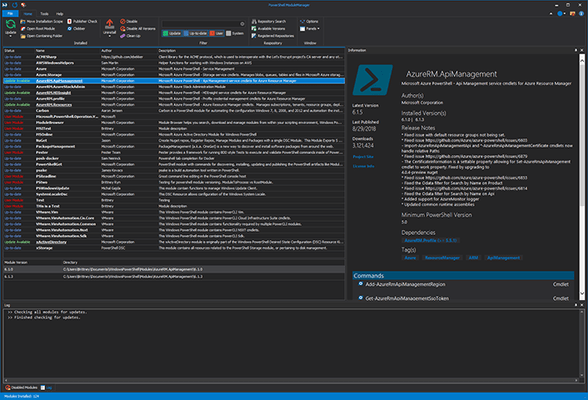
PowerShell ModuleManager 2019
Released: Dec 3, 2018
Aggiornamenti in 2019 (1.0.2)
Funzionalità
- Added: Ability to cache module information from current session to load into next session.
- Added: Update All button on ribbon. Update all modules that appear to have an update.
- Added: Install Versions of modules from the Respository Search Dialog.
- Added: Keyboard Shortcuts for update, uninstall, and disable.
- Added: PowerShell Core button on ribbon.
- Added: Remove all old versions when updating module.
- Added: Remove old versions, keeping only the latest version installed.
- Added: Move Installation Scope - Toggle between between the two install locations (Program Files and Documents).
- Added: Open Root Module - Open the main file listed as the Root Module file with default editor for file type.
- Added: Open Containing Folder - Open the module folder.
- Added: Clobber Check.
- Added: Publisher Check.
- Added: Commandline Arguements for searching a repository.
- Added: Dependency information to Information Pane and ability to click and open search.
- Added: Project Url and License Url were added to Information Pane, only visible if information is found.
- Added: Add all sapien products to tools page on ribbon.
- Added: Ability to change execution policy via Script Security Center.
- Updated: Changed layout of Information Pane data.
Correzioni
- Fixed: Catch install error for publisher check and accept license.
- Fixed: Skin change colors entires window.
- Fixed: Fix information pane sizing.
- Fixed: Context menu not dismissed.
- Fixed: Improve performance on start.