ActiveAnalysis 2.1 adds PDF export capability

Offer PDF to your users, complete with encryption, permissions, page layout, and printing options.
5월 19, 2011
기능 릴리스

ActiveAnalysis (formerly Data Dynamics Analysis) is a complete OLAP, data visualization and Business Intelligence component for Silverlight, Windows Forms and ASP.NET that allows you to rapidly embed interactive, ad hoc Business Intelligence features for both Windows and Web applications. ActiveAnalysis 2 comes with the ability to connect to virtually any data source and support for three development platforms, rolling out your own ad hoc Business Intelligence application is now easier than ever. ActiveAnalysis 2 features include:  charts, pivot tables and data visualization, rich drag-and-drop user experience, Excel exports allow end users to share analysis results offline and much more.

Updates in 2.1

  • Export your analysis results to PDF so you can reliably print your findings - Now you can offer portable document format to your users, complete with encryption, permissions, page layout, and printing options. Developers can even add watermarks, set 128 bit encryption, and control how the Adobe Acrobat Reader appears when the document opens
  • Schema editor - Visually edit or create new schemas with Undo functionality that lets you experiment more boldly. You can view query fields and schema fields in panes and double-click them to see their properties, and drag and drop them into expression boxes to ease calculated field creation
  • Four new aggregate functions - With four new aggregate functions, there are now over twenty ways to aggregate data in your schemas. The new functions are AggregateIf, DistinctSum, Median, and Mode
  • Support for analysis in Windows Azure in full and partial trust mode - Now you can use the Web or Silverlight PivotView in the cloud without requiring full trust. Some controls have some limitations in partial trust, but ActiveAnalysis just works
  • Show and hide cubes in the cubes list - Use the new SetCubeFilter method to select which cubes your users can access
  • Support for custom controls to show underlying data - When your users right-click data and opt to show the underlying data, you can now control exactly how that data is presented. You can leave it in the included grid, or send the data to a custom or third-party control
  • Improved custom toolbar support - For even more control over what your users see, you can customize the toolbar, adding new buttons and removing parts of the existing toolbar, or even adding buttons from the toolbar to your own

About ComponentOne

ComponentOne headquartered in Pittsburgh, Pennsylvania, is a leader in the Microsoft Visual Studio component industry. The company believes the key to successful implementation of business solutions is providing customers with a premier studio of innovative components and tools. On July 1, 2012, ComponentOne and GrapeCity joined forces, creating ComponentOne, a division of GrapeCity. The US GrapeCity PowerTools division was renamed to ComponentOne.
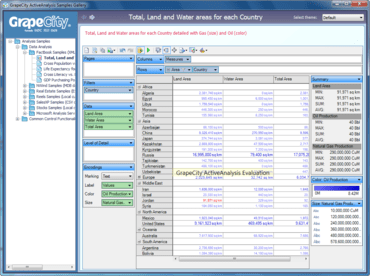
Land and water area sample analysis in ActiveAnalysis.

ActiveAnalysis

Provide an interactive decision support system that allows users to explore their relational and multidimensional data in an useful way.

궁금한 점이 있으세요?

MESCIUS (formerly GrapeCity) 사 제품 라이선스 담당자와 라이브 채팅
