New “Lock the Center Point” mode: By turning this new mode on, Astah will keep the connecting points as they are and keep your diagrams neat and clean for you as you edit.
Better behaviour on Suggest Feature: From this version, simply select a model when that happens, so that the small icons will disappear and you can focus on your work without any distractions.
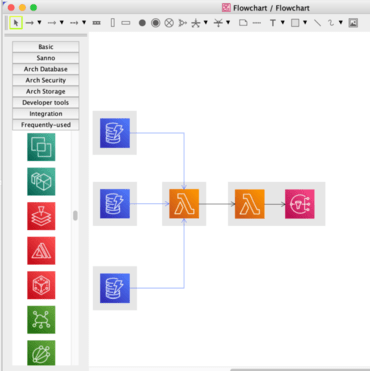
System architecture diagrams: You can create your own icon library by importing AWS Architecture Icons and create diagrams with them. We improved the UI of the Icon library and Flowchart-specific Icon library.
Display all the text on hover: Now you can see all the text by hovering on the cut-out text in the property view (the left-bottom pane of Astah).
Expand/Collapse options in the Tree view: When you traverse the hierarchy of the tree of your project, you can now choose from [Expand All], [Expand One Level] and [Collapse All] instead of double-clicking one by one to open/close the nodes.
Enhanced “State Transition Table Plug-in”: Now you can filter which states you want to show in the State Transition Table and also sort the list of states in the table as you like directly in Astah.