Released: Oct 2, 2020
2020.1 버젼 업데이트
기능
Microsoft .NET Core Assemblies
- Control products now ship in both Microsoft .NET Framework 4.0 and Microsoft .NET Core 3.0 assembly variations. You will now be able to use native .NET Core-based Actipro assemblies in your .NET Core apps.
NuGet Packages
- Another big request has been to supply NuGet packages for the controls. NuGet packages are published on nuget.org and contain both the .NET Core and .NET Framework variations of the assemblies.
Ribbon
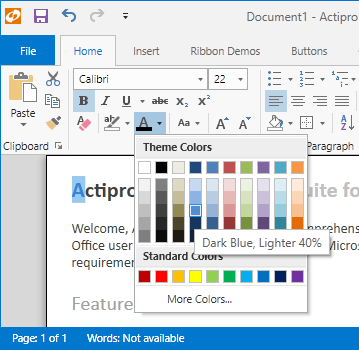
- Made massive updates to modernize the Ribbon...
Released: Aug 13, 2020
2019.1 build 0686 버젼 업데이트
기능
- Updated the mini-toolbar to not close when unfocused and the Ctrl or Shift modifier keys are pressed.
Released: Mar 25, 2020
2019.1 build 0685 버젼 업데이트
기능
- Adjusted how the default 'Segoe UI' font is set on various Ribbon controls, allowing for easier customization if desired.
수정사항
- Fixed a bug where a menu item SplitButton didn't handle its disabled state properly.
Released: Jan 10, 2020
2019.1 build 0684 버젼 업데이트
수정사항
- Updated the Customizing Context Menus QuickStart to work properly with recent changes made to ContextMenu auto-generation logic for controls within Ribbon.
- Fixed a bug where the Backstage close button wouldn't be fully visible if the containing RibbonWindow's IsTitleBarVislble property was set to false.
- Fixed a bug where setting the SplitButton and PopupButton.BorderBrush properties wouldn't update the default transparent outer border.
- Fixed a possible exception that could occur when...
Released: Jun 7, 2019
2019.1 build 0681 버젼 업데이트
기능
- Added virtual Ribbon.CreateContextMenu method that can be overridden to customize a context menu.
Released: May 24, 2019
2018.1 build 0676 버젼 업데이트
기능
- Added the Tab.UseColors property that is set appropriately by each theme via a new AssetResourceKeys.ContextualTabUseColorsBooleanKey resource.
- Updated how the Tab.IsSelected property is implemented.
- Updated the PopupControlService logic for attempting to focus the first focusable child control on an opened popup.
- Improved the ability of buttons to coerce a default checkable command parameter when the Command property is set.
수정사항
- Fixed a bug where an in-ribbon gallery might not properly...
Released: Mar 11, 2019
2018.1 build 0675 버젼 업데이트
기능
- Updated the RibbonCommands.ToggleMinimization command so that the KeyGesture (defaulting to Ctrl+F1) assigned to its InputGestures will be used to execute the command.
- Updated TextBox controls on the ribbon to show their default context menus.
- Improved built-in context menu display logic.
- Improved the handling of focus tracking when DefaultAcquireHwndFocusInMenuMode is false.
Released: Dec 13, 2018
2018.1 build 0674 버젼 업데이트
기능
- Updated RibbonWindow template to ensure that any StatusBar set to the RibbonWindow.StatusBar property is last in tab order.
Released: Oct 16, 2018
2018.1 build 0673 버젼 업데이트
기능
- Updated large ribbon buttons to have the possiblity of breaking text after zero-width space characters.
- Improved the rendering of Backstage tabs and buttons in Metro themes.
수정사항
- Fixed a bug related to reporting menu mode changes with InputManager.
Released: Jul 24, 2018
2018.1 build 0672 버젼 업데이트
기능
- Added UI automation peer for the ScreenTip control.