
Add-in Express Regions for Microsoft Outlook and VSTO
Outlook Explorer 및 Inspector 창에 보기 및 양식 영역을 만듭니다.
Add-in Express사에서 공개
2006년 부터 ComponentSource에서 판매중
더 이상 이 제품을 제공 하지 않습니다.
Outlook Explorer 및 Inspector 창에 보기 및 양식 영역을 만듭니다.
Add-in Express사에서 공개
2006년 부터 ComponentSource에서 판매중
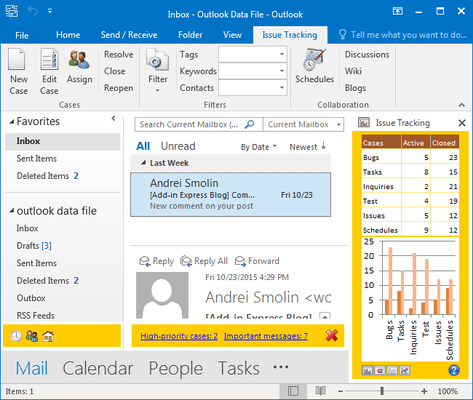
Outlook Explorer 및 Inspector 창에 보기 및 양식 영역을 만듭니다.
Add-in Express Regions for Microsoft Outlook and VSTO is an extension of Visual Studio Tools for Office that allows you to customize Outlook views and Outlook forms with any .NET control. Traditional COM Add-ins developed with VSTO limit developers to using very basic and restricted task panes, or using Outlook Form Regions that have quirky limitations. Add-in Express Regions offer many more features that can be implemented into existing VSTO Outlook COM Add-in projects. Regions can be resized, hidden, shared, dragged, docked and more.
Add-in Express Regions offer many features that can be implemented into existing VSTO Outlook COM Add-in projects:
Regions for your existing VSTO projects
This solution effectively allows you to continue designing your Outlook solutions using Visual Studio Tools for Office in Visual Studio. In other words, even if you have an Outlook Add-in project developed with VSTO, you can install Add-in Express Regions and immediately start taking advantage of the powerful Advanced Outlook View and Form Regions technology.
전화 : 00798 14 800 6332
팩스 : +1 770 250 6199


