
OCR Xpress for Linux
사용자 지정 응용 프로그램에 강력한 전체 페이지 광학(optical) 문자 인식 및 텍스트 추출을 빌드합니다.
Accusoft사에서 공개
1998년 부터 ComponentSource에서 판매중
더 이상 이 제품을 제공 하지 않습니다.
사용자 지정 응용 프로그램에 강력한 전체 페이지 광학(optical) 문자 인식 및 텍스트 추출을 빌드합니다.
Accusoft사에서 공개
1998년 부터 ComponentSource에서 판매중
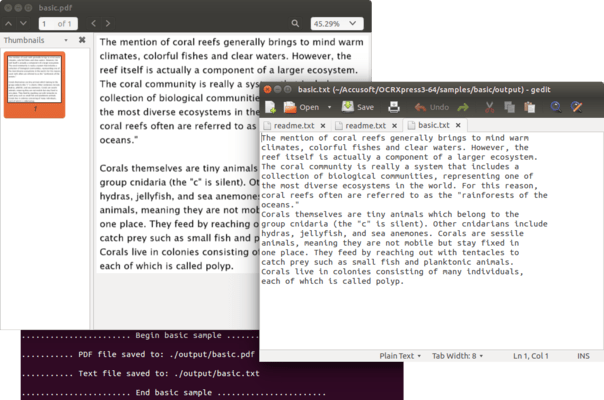
Please note that OCR Xpress has been discontinued and if you require OCR functionality you may be interested in ImageGear for C and C++ for Linux.
If you are an existing customer then you can still purchase runtime licenses, please contact sales@componentsource.com for details.
Speed and ease of use
Simple, straightforward setup, with a clean, easy to use API for quick integration into your applications. High level API allows developers to easily convert an image to text or searchable PDF with only 9 lines of code. For other more complex implementations, developers can easily access document information in data structures, such as page, paragraph, text line and character data.
Accuracy
Convert images into text and reduce manual data entry with high levels of accuracy that meet or exceed industry best standards. Confidence values are returned with each character, enabling you to check your extraction results.
Full page optical character recognition
Convert full-page and multi-page images to text output. Allows output to multi-page, searchable PDF files.
Automatic image and text segmentation
Compatible with various page layouts, including interspersed photos and graphics within text. Image-over-text PDF output has searchable text that aligns with the text on the image, and adjusts for varying font sizes on the page.
Generate text and PDF files
For images to be searchable, export to PDF image-over-text documents. Export to text files for use in updating metadata or tag data for image based documents in your ECM system.
Output data structures
Access results through an output structure that provides information about layout, content and recognition confidence. Developers can access the text at multiple levels including a text line, a word within that line, or a character within that line or word.
Supported languages for OCR Xpress for Linux
| English | Japanese |
| Arabic | Korean |
| Bulgarian | Latvian |
| Catalan | Lithuanian |
| Chinese (Simplified) | Norwegian |
| Chinese (Traditional) | Polish |
| Croatian | Portuguese |
| Czech | Romanian |
| Danish | Russian |
| Danish Fraktur script | Serbian |
| Dutch | Slovak |
| Finnish | Slovak Fraktur script |
| French | Slovenian |
| German | Spanish |
| German Fraktur script | Swedish |
| Greek | Tagalog |
| Hebrew | Thai |
| Hindi | Turkish |
| Hungarian | Ukrainian |
| Indonesian | Vietnamese |
| Italian |
전화 : 00798 14 800 6332
팩스 : +1 770 250 6199


