UEStudio Suite

콘텐츠를 작성 및 수정하고, 프로젝트에서 공동 작업하고, 변경을 관리하며, 파워 검색을 수행하고 안전하게 파일을 전송합니다.

UltraEdit사에서 공개
2013년 부터 ComponentSource에서 판매중
i

Please Note: UEStudio Suite is replaced by UltraEdit Enterprise (formerly UltraEdit All Access).
The products within the suite are still supported and existing customers can contact us for a quote to renew their maintenance subscription.

UltraFTP v17.00

Released: May 24, 2017

v17.00 버젼 업데이트

기능

UltraFTP Key Features:

  • Tabbed sessions
    • Open multiple simultaneous connections in multiple tabs
    • Save and reload sessions
    • Set session to automatically connect, as well as initial starting directories
    • See connection/transfer status in session tab
  • Split local and remote view
  • Drag-and-drop transfers
    • Drag-and-drop files from desktop / Windows explorer to FTP server location
    • Drag-and-drop files from remote server to folders on desktop / Windows explorer
    • Drag-and-drop files from one remote server to another
  • Global overwrite rules
    • Define on a per-account basis under the Transfers tab for each account
    • Configured to Prompt, Skip, or Overwrite based on defined conditions
    • May be modified on a per-session basis in the Session Properties dialog
  • Transfers window
    • Monitor transfer progress and cancel transfers
  • Accounts & Sessions window
    • Create, save, and manage multiple accounts and sessions
    • Filter, group, and sort accounts and sessions
  • File preview window
    • Preview plain text and source files, Office docs, images, and more – on local or from remote server
  • FTP, SFTP, and FTPS support
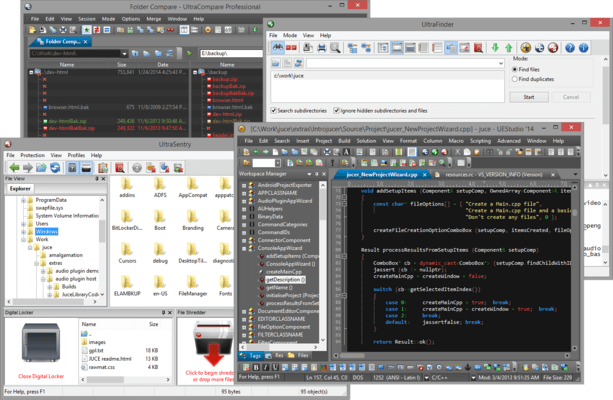
  • UltraEdit / UEStudio / UltraCompare / UltraFinder integration
    • Open selected file(s) in UltraEdit or UEStudio
    • Modify and save remote files back to server
    • Compare selected files in UltraCompare
    • Search selected folder with UltraFinder