Aspose.Slides for SharePoint V18.6

Defina o ângulo de rotação para os títulos de eixo gráfico.
Julho 4, 2018
Nova versão

Recursos

  • Set precision data in chart data labels.
  • Set date format in category axis values.
  • Set rotation angle for chart axis title.
  • Switch row/column chart data.
  • Set chart marker options on data points.
  • Set position axis in category or value axis.
  • Show Display Unit labels on chart value axis.
  • Set markers for particular chart series points.
  • Get series data point color from theme.
  • Support for Bubble chart size scaling.
  • Set series overlap for clustered Bar chart.
  • Manage visibility of data labels located outside plot area.
  • Improved slide graph quality.

Correções

  • Low quality PDF generated.
  • The WMF image is corrupted in PDF output.
  • When PPTX is converted to PDF, vertical axis of the graph contains additional items..
  • PPTX to PDF - space difference between text and line.
  • When PPTX is converted to PDF, the vertical graphs lines are different.
  • Some spacing is lost in the output PDF.
  • Circles in the output PDF don't match the source presentation.
  • The chart horizontal axis is corrupted in PDF output.
  • Font styles change to italic when saving presentation as HTML.
  • JpegQuality setting not working when saving PPTX with JPEG image as PDF.
  • Setting chart data value in chart worksheet does not refresh chart.
  • Chart data not updating.
  • The animation synchronization is lost in the output presentation.
  • NullReference exception is thrown on loading presentation.
  • PPT to PPTX conversion result in corrupt presentation due to WordArt text present in slide.
  • Custom Marker image failed to rendered in generated PDF.
  • Shadow effects on text are lost when saving presentation using Aspose.Slides.
  • WordArt is improperly rendered in generated PDF.
  • Improper vertical axis rendering in generated PNG.
  • Export to PPTX works but PPT fails.
  • Exception on presentation load.
  • XmlException on loading the presentation.
  • Font size changes after saving.
  • Background change color after saving.
  • PPTX to PDF not properly converted.
  • Charts are improperly rendered in generated PDF.
  • Chart changes after cloning.
  • Layout changed while converting PPTX to PDF.
  • Language changed when converting PPTX to PDF.
  • Low quality images generated from presentation.
  • The axis major unit has been changed in generated PNG.
  • Chart title differs from expected.
  • PPTXReadException on loading presentation.
  • Repair message in saved file.
  • NullPointer Exception on loading presentation.
  • PPTXReadException on loading presentation.
  • System.Exception on loading presentation.
  • ODP to PPTX not properly converted.
  • Content moved in generated HTML.
  • PPTX not properly converted to PPT.
  • Saved PPT presentation requires repairing in PowerPoint.
  • Application Hangs while saving PPTX.
  • Conversion process never ends.
  • Argument Exception is thrown in Box&Whisker chart has only 2 categories.
  • Setting RawFrame property has no effect for SmartArtShape.
  • Overflow exception on saving if chart data point has blank value.
  • No format validation for images resource.
Aspose.Slides for SharePoint

Aspose.Slides for SharePoint

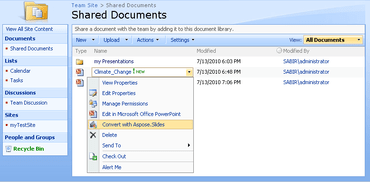
Converta arquivos do PowerPoint para outros formatos de arquivo de dentro de um aplicativo do SharePoint.

Tem alguma pergunta?

Chat ao vivo com nossos especialistas de licenciamento de Aspose.